
The whole handbook9 articles · 45 minQuick referencePDF · 338 KBModel (GLB)GLB · 1.4 MBCAD (STEP)ZIP · 1.2 MBSN65HVD230 datasheetPDF · ti.comPinout and specsThe pin table, and the questions people ask first
Build it with your AI
Pick what you want to make, copy, and paste it into ChatGPT, Claude or any assistant. It carries the specs and links to the whole handbook and its own sketches, so the assistant starts from them instead of guessing.
I have a Lonely Binary CAN Bus (product code tk109). Help me with this:

Help me with the handbook's example "The first message" (https://learn.lonelybinary.com/tinkerblock/blocks/can-bus/first-message): get it running on my board, and explain the wiring.

Before you write any code, open these. They are the maker's reference for this exact product:
- The full reference (specs, wiring, every example sketch, troubleshooting): https://learn.lonelybinary.com/ai/tk109.md
- The handbook's sketch for this task: https://learn.lonelybinary.com/ai/tk109/tk109_first_message.ino

Start from that sketch and change only what my task needs. Tell me the wiring, pin by pin, and the board settings.
If you cannot open links, use the facts below. Do not invent pins, voltages or libraries that are not here; ask me instead.

Specifications:
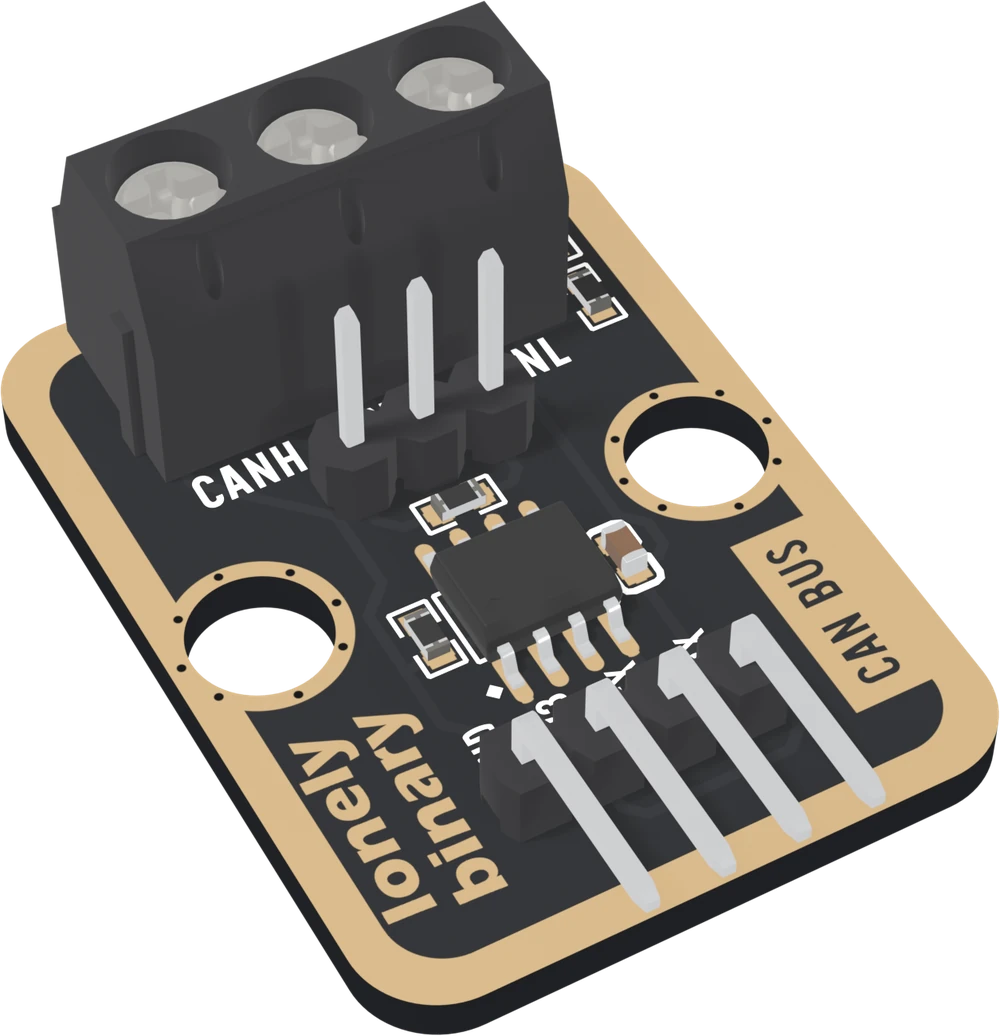
- Type: CAN bus transceiver, ISO 11898-2 high-speed physical layer. It carries a CAN controller's frames onto CANH and CANL; it is not a controller itself
- Chip: SN65HVD230 (Tokmas SN65HVD230DR, a second source of TI's part), SOIC-8
- Supply: 3.0 to 3.6 V on 3V3: a 3.3 V board. CTX and CRX take at most 0.5 V above the supply, so the board is for 3.3 V logic only, never 5 V
- Host: A microcontroller with a CAN controller: most ESP32 chips (Espressif calls it TWAI), many STM32. An Arduino Uno has none
- Header: 4-pin right-angle male, 2.54 mm: GND, 3V3, CTX (chip D, to your CAN TX pin), CRX (chip R, to your CAN RX pin). Straight across
- Bus: CANH, GND, CANL on a 5.0 mm screw terminal and again on 3 male pins, the same three nets
- Termination: 120 Ω across CANH and CANL on every board. Keep it on the two boards at the ends of the cable and remove it from the rest
- Speed: Tested at 500 kbit/s. The chip is rated to 1 Mbit/s; this board's 10 kΩ slope control slows its edges, so 1 Mbit/s suits only a short bus
- Bus range: −2 V to +7 V common mode, so GND runs with the pair; ±16 kV ESD on the bus pins; up to 120 nodes by TI's figure
- Board: 22.4 × 30.4 mm TinkerBlock board, two LEGO-compatible holes 16 mm apart, red power LED
- In the box: 6 × TK109 CAN bus block, headers fitted

Questions people ask:
- Does it work with an Arduino Uno? Not on its own. The Uno has no CAN controller and runs 5 V logic, which this board's pins cannot take. Use an ESP32, which has the controller built in, or add a CAN controller chip and a level shifter to the Uno.
- Do I cross CTX and CRX? No. They are named from the microcontroller's side: CTX to your CAN TX pin, CRX to your CAN RX pin, straight across.
- Do I need to remove the 120 Ω resistor? Only on boards in the middle of a bus. Keep it on the two boards at the ends of the cable. With two boards, keep both; with all six on one cable, remove it from the four between.
- Why does my single board keep reporting errors? Every CAN frame must be acknowledged by another board. Alone, a sender resends each frame and counts an error every time. Add a second board running a sketch that starts its CAN controller at the same bit rate.
- Do I need to connect GND between boards? Yes. The receiver needs CANH and CANL within −2 V to +7 V of its own ground, and boards on separate supplies share no ground unless a wire gives them one. Run GND with CANH and CANL, which go on one twisted pair.
- How fast and how far? About 100 m at 500 kbit/s, the rate the boards were tested at, and further at slower rates: about 500 m at 125 kbit/s. 1 Mbit/s is the chip's rating and suits a short bus on this board.
Community
Ask a question ↗Product questions
See what other owners have asked, and read their solutions.
CAN Bus
Loading discussions…
Need another
CAN Bus TK109
Order or missing parts?
Email us or reply to your order, and quote tk109 — that identifies the product. If something is missing from the bag, your order is the record of what shipped.
Take it with you
Point a phone camera at the code and this page opens there. It is the same address as the one printed on your box, so it is also what to show someone you are passing the board to.