
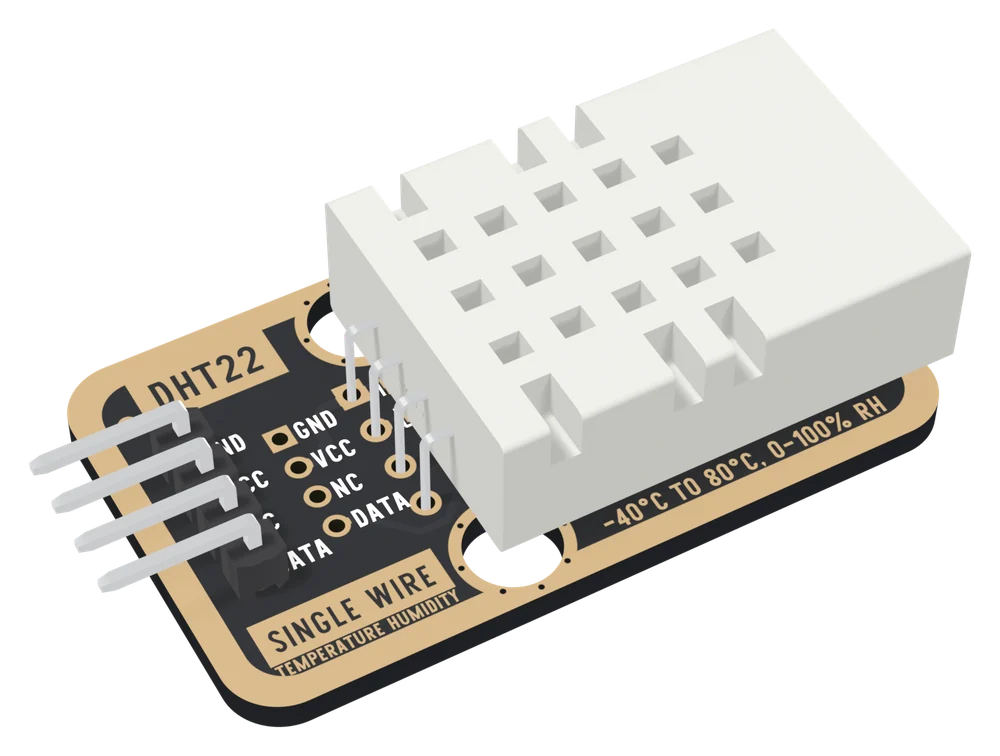
The TK39 at an angle: a black board with a gold border and a large white DHT22 sensor cage with a grid of square vents lying over its right half, four sensor leads soldered beside it, DHT22, GND, VCC, NC and DATA printed on the left, SINGLE WIRE and TEMPERATURE HUMIDITY along the bottom, -40°C TO 80°C, 0-100% RH beside the cage, and a right-angle four-pin header out of the left edge.
VR

View it in VR

This board opens in a VR headset: life-size, or big enough to stand beside, with every pin and every part named where it sits. Open this address in the browser on a headset such as Apple Vision Pro or Meta Quest.

learn.lonelybinary.com/vr/tk39
You have this

DHT22 Temperature and Humidity Sensor

A DHT22 on a TinkerBlock board, the TK39: temperature from −40 to 80 °C to ±0.5 °C and humidity from 0 to 100 % to ±2 %, in tenths, on one data wire. The 10 kΩ pull-up is fitted, so it is three wires and one library. Feed VCC what your board's pins run at, and read it no more than once every two seconds.

Temperature
±0.5°C, −40 to 80 °C
Humidity
±2% RH, 0 to 100 %
Wires
3GND, VCC, DATA
Supply
3.3 to 6V; use your logic voltage

Turn it over and see the three holes to wire: GND, VCC and DATA. NC reaches nothing, and the 10 kΩ pull-up on DATA ends at VCC, so VCC is your board's logic voltage.

Product questions & answers ↓

Community

Product questions

See what other owners have asked, and read their solutions.

Ask a question ↗

DHT22 Temperature and Humidity Sensor

Loading discussions…

Need another
Comes in this kit — not sold separately
Order or missing parts?

Email us or reply to your order, and quote tk39 — that identifies the product. If something is missing from the bag, your order is the record of what shipped.

Take it with you

Point a phone camera at the code and this page opens there. It is the same address as the one printed on your box, so it is also what to show someone you are passing the board to.