This lesson uses: Arduino UNO R3 board, TinkerBlock TK12 NTC Thermistor module, jumper wires (or breadboard). Learn to read NTC with analog input and do simple conversion; outcome: serial continuously shows raw value (0–1023) and converted voltage (0–5V); values change when you warm the module.
1. Wiring
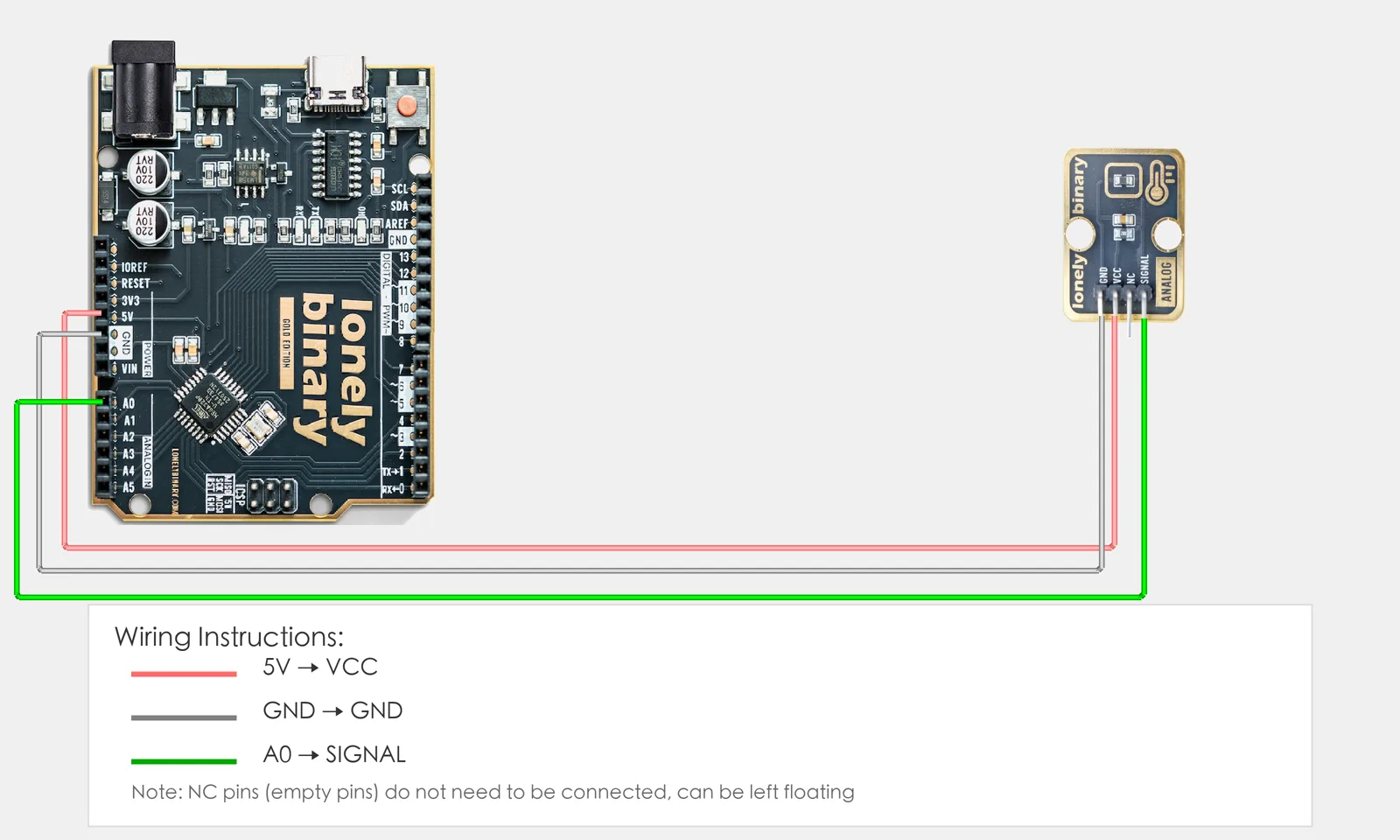
Connect TK12 NTC Thermistor to Arduino:
- GND → Arduino GND
- VCC → Arduino 5V
- SIGNAL → Arduino A0
- NC leave unconnected
2. New sketch
- Arduino IDE: File → New (or Ctrl/Cmd + N) to create a blank sketch
- Confirm board and port are selected (same as Lesson 01)
- Type the code below into the default
setup()andloop()yourself
3. Program structure
Same as last lesson: two fixed blocks setup() and loop().
setup(): Start the serial port (to see values on the computer); runs once.loop(): Keep repeating “read A0 → store in variable → simple conversion → print to serial → short delay”.
When you warm the module with your hand, the voltage on the serial will change—upload and run to see it.
4. Code to write
Type the code below line by line into setup() and loop() (do not copy-paste; typing it yourself helps you remember):
#define TEMP_PIN A0   // Temperature sensor on A0

void setup() {
  Serial.begin(9600);   // Start serial, baud 9600
  Serial.println("NTC Thermistor program started");
}

void loop() {
  int val = analogRead(TEMP_PIN);   // Read A0, store in val (0-1023)

  // Simple conversion: map analog value (0-1023) to voltage (0-5V)
  float voltage = val * (5.0 / 1023.0);

  // Print raw value and voltage
  Serial.print("Analog: ");
  Serial.print(val);
  Serial.print(" | Voltage: ");
  Serial.print(voltage, 2);   // 2 decimal places
  Serial.println("V");

  delay(500);   // 500 ms
}
Program notes
Overall idea: Use analogRead(A0) to get 0–1023; multiply by (5.0/1023.0) to get 0–5V and print to serial. This lesson only does “analog value → voltage” linear conversion; temperature conversion with Beta equation is in Lesson 27.
| Code | In this lesson |
|---|---|
int val | Holds analog value 0–1023 |
float voltage | Float variable for converted voltage 0.0–5.0 |
val * (5.0 / 1023.0) | Linear conversion: ADC value to 0–5V |
Serial.print(voltage, 2) | Print voltage with 2 decimal places |
5. Hands-on
- After entering the code, click Verify (✓) to compile
- Click Upload (→) to upload to the board
- Open Serial Monitor (Tools → Serial Monitor, baud 9600)
- Watch the Serial Monitor:
- Warm the TK12 module with your hand: voltage value will change
- Higher temperature gives larger (or smaller) voltage depending on module
- (Optional) Heat the module with a lighter or hot air and observe voltage change
Expected result:
Serial monitor shows:
NTC Thermistor program started
Analog: 512 | Voltage: 2.50V
Analog: 523 | Voltage: 2.56V
Analog: 678 | Voltage: 3.31V
...
Proceed to Lesson 13.
6. Common issues
| Symptom | What to do |
|---|---|
| Serial monitor shows nothing | Ensure Serial.begin(9600) is in setup(); set Serial Monitor baud to 9600 |
| Voltage does not change | Check TK12 wiring GND→GND, VCC→5V, SIGNAL→A0; try heating the module |
| Compile error | Check brackets and semicolons; spelling of float |
Edit this page — content/guides/tinkerblock-workshop/12-ntc-thermistor.mdx
Questions about this product
See what other owners have asked, and read their solutions.
NTC Thermistor
Loading discussions…
Discuss this article
Ask about this page. The answer stays here, on the page it belongs to, for whoever hits the same wall next.