This lesson uses: Arduino UNO R3 board, TinkerBlock TK28 Knock Sensor module, TinkerBlock TK01 XL LED module, jumper wires (or breadboard). Learn the knock sensor; outcome: every tap on the module flashes the LED.
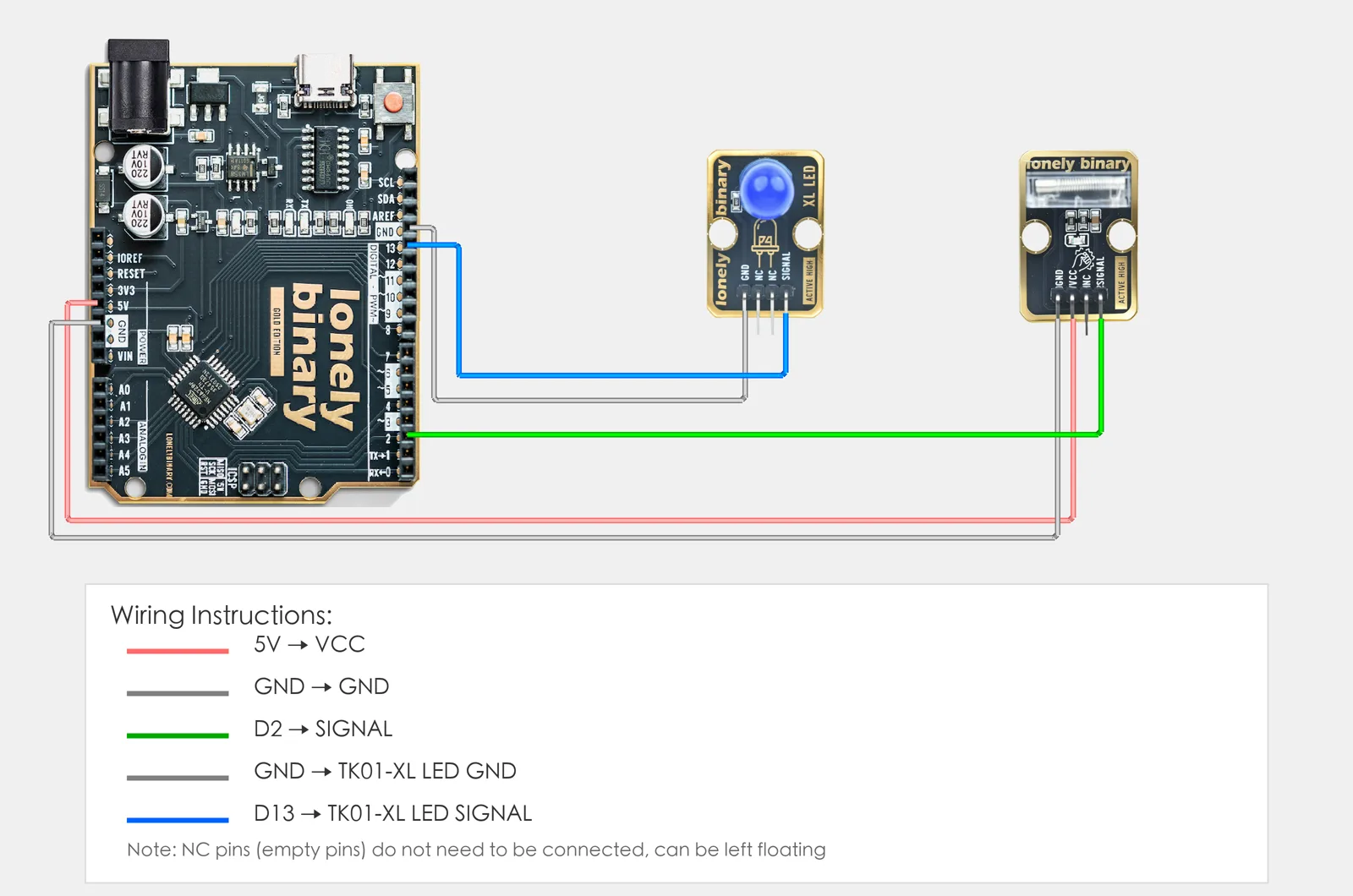
1. Wiring
- TK28 Knock Sensor: VCC → 5V, GND → GND, SIGNAL → D2, NC leave unconnected
- TK01 LED: GND → GND, SIGNAL → D13
2. New sketch
- Arduino IDE: File → New (or Ctrl/Cmd + N) to create a blank sketch
- Confirm board and port are selected (same as Lesson 01)
- Type the code below into the default
setup()andloop()yourself
3. Program structure
Same as last lesson: two fixed blocks setup() and loop().
setup(): Tell the board “pin 2 for reading the knock sensor, pin 13 for the LED”; runs once.loop(): Keep repeating “read pin 2 → if knock detected then LED on for 100 ms, else LED off”, as fast as it can go.
Tap the module and the LED flashes. Upload and try it.
4. Code to write
Type the code below line by line into setup() and loop() (do not copy-paste; typing it yourself helps you remember):
#define KNOCK_PIN 2    // Knock sensor on D2
#define LED_PIN 13     // LED on D13

void setup() {
  pinMode(KNOCK_PIN, INPUT);   // D2 input, read knock sensor
  pinMode(LED_PIN, OUTPUT);    // D13 output, control LED
}

void loop() {
  int state = digitalRead(KNOCK_PIN);   // HIGH for a moment on each knock

  if (state == HIGH) {
    digitalWrite(LED_PIN, HIGH);   // Knock detected: LED on
    delay(100);                    // long enough to see
  } else {
    digitalWrite(LED_PIN, LOW);    // No knock: LED off
  }
}
Program notes
Overall idea: Like the collision sensor: digital input on D2, which TK28 holds LOW with its own pull-down. A knock swings the spring inside it onto a rod, and SIGNAL goes HIGH for about a millisecond each time they touch. That is far too short to see, so the sketch holds the LED on for 100 ms. There is no delay() while waiting: a loop that slept 100 ms between reads would miss almost every knock.
| Code | In this lesson |
|---|---|
digitalRead(KNOCK_PIN) | Read knock state: knock=HIGH, no=LOW |
if (state == HIGH) | If knock then LED on for 100 ms, else off |
5. Hands-on
- After entering the code, click Verify (✓) to compile
- Click Upload (→) to upload to the board
- Knock detection:
- Try different tap strengths and observe when it triggers
Expected result:
Proceed to Lesson 15.
6. Common issues
| Symptom | What to do |
|---|---|
| LED does not turn on when tapping | Check TK28 wiring VCC→5V, GND→GND, SIGNAL→D2; TK01 SIGNAL→D13, GND→GND; try tapping harder |
| LED always on | TK28 may be detecting continuous vibration; stop vibration and try again. Check the sketch uses INPUT, not INPUT_PULLUP |
| LED flashes only now and then | A delay() between reads sleeps through the knocks, which last about a millisecond. Keep the only delay inside the if |
Edit this page — content/guides/tinkerblock-workshop/14-knock-sensor.mdx
Questions about this product
See what other owners have asked, and read their solutions.
This page covers several products. Choose yours to see the right discussions.
Discuss this article
Ask about this page. The answer stays here, on the page it belongs to, for whoever hits the same wall next.