This lesson uses: Arduino UNO R3 board, TinkerBlock TK37 Passive Buzzer module, jumper wires (or breadboard). Learn tone() and noTone(); outcome: buzzer plays Do, Re, Mi in sequence then stops; can be extended to simple melodies.
1. Wiring
Connect TK37 Passive Buzzer to Arduino:
- GND → Arduino GND
- VCC → Arduino 5V
- SIGNAL → Arduino D3
- NC leave unconnected
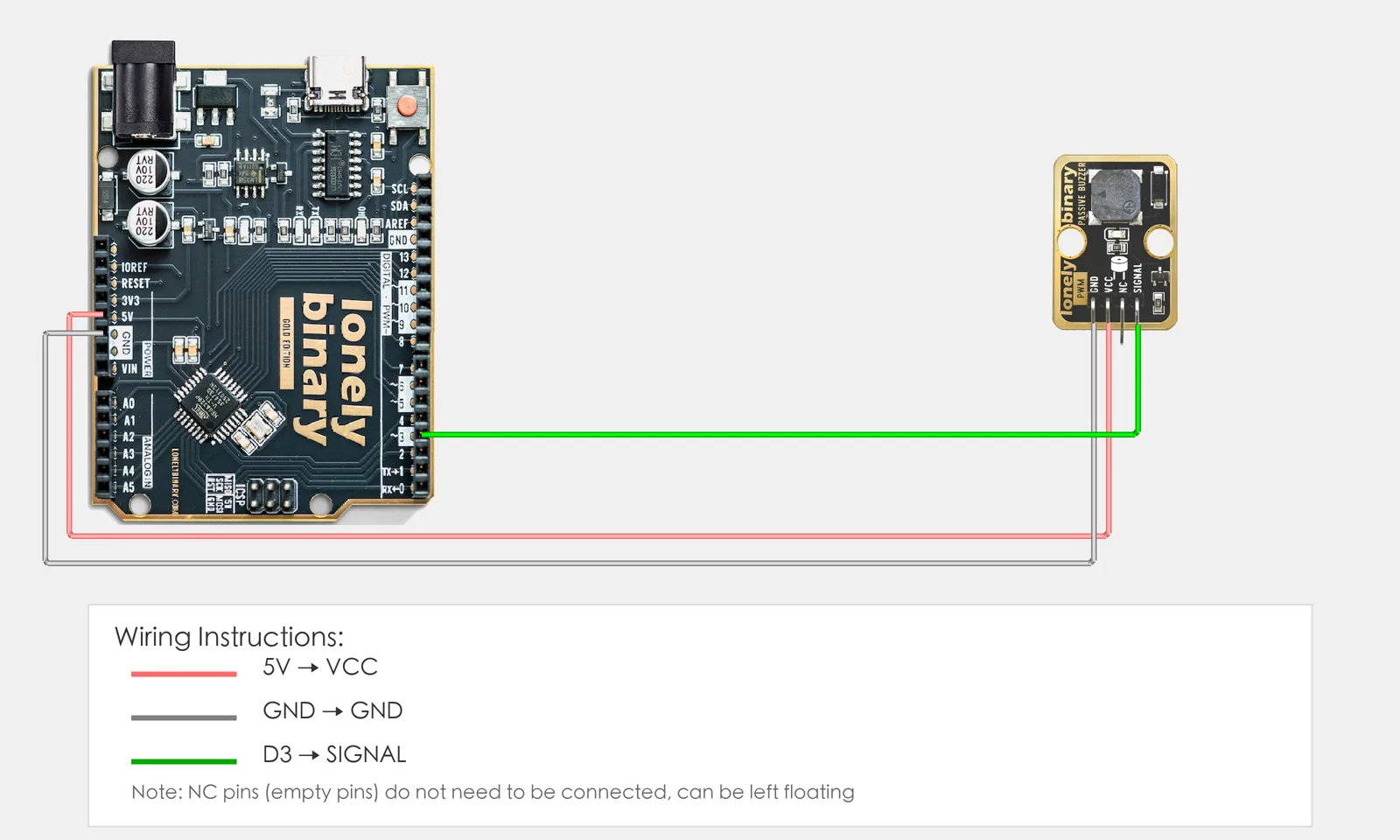
2. New sketch
- Arduino IDE: File → New (or Ctrl/Cmd + N) to create a blank sketch
- Confirm board and port are selected (same as Lesson 01)
- Type the code below into the default
setup()andloop()yourself
3. Program structure
Same as last lesson: two fixed blocks setup() and loop().
setup(): Start serial (optional, for printing status); runs once.loop(): Keep repeating “play different frequencies → wait → stop → repeat”.
Upload and the buzzer will play Do, Re, Mi in order; different frequency = different pitch.
4. Code to write
Type the code below line by line into setup() and loop() (do not copy-paste; typing it yourself helps you remember):
#define BUZZER_PIN 3   // Buzzer on D3

void setup() {
  Serial.begin(9600);   // Optional: print note names to serial
  Serial.println("Passive buzzer program started");
}

void loop() {
  // Play Do (262 Hz)
  tone(BUZZER_PIN, 262);   // Play 262 Hz
  Serial.println("Do");
  delay(500);

  // Play Re (294 Hz)
  tone(BUZZER_PIN, 294);   // Re
  Serial.println("Re");
  delay(500);
  tone(BUZZER_PIN, 330);   // Mi
  Serial.println("Mi");
  delay(500);
  noTone(BUZZER_PIN);      // Stop sound
  delay(1000);             // Pause 1 s before repeat
}
Program notes
Overall idea: Passive buzzer needs a frequency signal to sound; tone(pin, frequency) outputs a square wave at that Hz; different frequency = different pitch; noTone stops. This lesson plays Do(262), Re(294), Mi(330) in order, 500 ms each, then stops 1 s.
| Code | In this lesson |
|---|---|
tone(BUZZER_PIN, 262) | Output 262 Hz on the pin; passive buzzer sounds; args are pin and frequency (Hz) |
noTone(BUZZER_PIN) | Stop sound on that pin |
| Frequency vs pitch | 262=Do, 294=Re, 330=Mi, 349=Fa, 392=Sol, 440=La, 494=Si (Hz) |
5. Hands-on
- After entering the code, click Verify (✓) to compile
- Click Upload (→) to upload to the board
- Listen to TK37: it should play Do–Re–Mi then stop
- Try yourself:
- Add more notes (Fa, Sol, La, Si)
- Change
delay()to speed up or slow down - Play a simple melody (e.g. “Twinkle Twinkle”)
Expected result: As in the figure.
Proceed to Lesson 18.
6. Common issues
| Symptom | What to do |
|---|---|
| Buzzer silent | Check TK37 wiring GND→GND, VCC→5V, SIGNAL→D3 |
| Very quiet | Passive buzzers are naturally quiet; try different frequency values |
| Sound never stops | Ensure noTone() is called to stop |
Edit this page — content/guides/tinkerblock-workshop/17-passive-buzzer.mdx
Questions about this product
See what other owners have asked, and read their solutions.
Passive Buzzer
Loading discussions…
Discuss this article
Ask about this page. The answer stays here, on the page it belongs to, for whoever hits the same wall next.