This lesson uses: Arduino UNO R3 board, TinkerBlock TK33 WS2812 RGB LED Bar module, jumper wires (or breadboard). Learn to control the WS2812 bar with FastLED library; outcome: one red LED moves along the bar in sequence—a running light.
1. Install the library
Before writing code, install the FastLED library:
- Arduino IDE: Tools → Manage Libraries...
- Search: FastLED
- Find FastLED by Daniel Garcia, click Install
- Wait until installation finishes
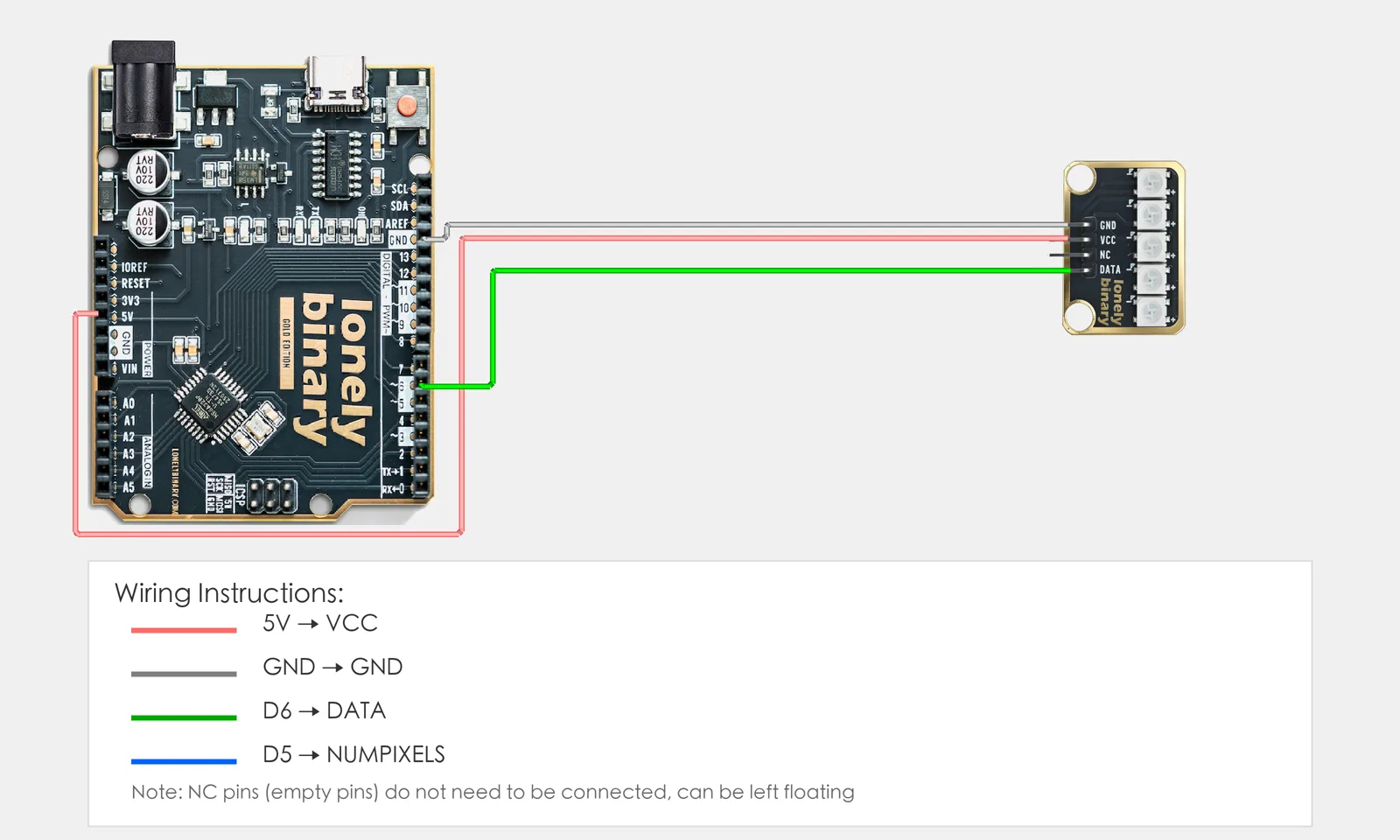
2. Wiring
Connect TK33 WS2812 RGB LED Bar to Arduino:
- GND → Arduino GND
- VCC → Arduino 5V
- DATA → Arduino D6
- NC leave unconnected
3. New sketch
- Arduino IDE: File → New (or Ctrl/Cmd + N) to create a blank sketch
- Confirm board and port are selected (same as Lesson 01)
- Type the code below into the default
setup()andloop()yourself
4. Program structure
Same as last lesson: two fixed blocks setup() and loop().
setup(): Include library, create strip object, set brightness; runs once.loop(): Keep repeating “set each LED color → update display → wait → repeat”.
One wire controls the whole bar; you’ll see one red dot “run” from one end to the other.
5. Code to write
Type the code below at the top of the file and in setup() and loop() (do not copy-paste; typing it yourself helps you remember):
// FastLED with WS2812 bar; DATA on one wire controls all LEDs
#include <FastLED.h>

#define DATA_PIN 6   // Bar DATA on D6
#define NUM_LEDS 5   // Number of LEDs (TK33 has 5)

CRGB leds[NUM_LEDS];   // Color array: leds[i] = RGB for LED i

void setup() {
  FastLED.addLeds<WS2812, DATA_PIN, GRB>(leds, NUM_LEDS);  // Type, pin, color order, array, count
  FastLED.setBrightness(50);   // Global brightness 0-255, avoid too bright
}

void loop() {
  // Running light: each round light LED i, others off; i from 0 to NUM_LEDS-1
  for (int i = 0; i < NUM_LEDS; i++) {
    for (int j = 0; j < NUM_LEDS; j++) {
      leds[j] = CRGB::Black;   // All off first
    }
    leds[i] = CRGB::Red;       // Only LED i red
    FastLED.show();            // Send array to bar so LEDs update
    delay(200);                // 200 ms before next
  }
}
Program notes
Overall idea: WS2812 bar is one DATA line in series; each LED’s color comes from the corresponding element of leds[]. In loop() two for loops: outer i = “which LED is on”; inner loop set all to black then set leds[i] to red, then FastLED.show() sends to hardware—one red dot moves step by step.
Why FastLED.show(): Changing leds[] only changes data in memory; only after show() is the data sent to the bar and the LEDs updated.
Color order GRB: WS2812 is often GRB (green-red-blue); CRGB::Red is sent in GRB order by the library, no need to convert.
| Code | In this lesson |
|---|---|
#include <FastLED.h> | Include FastLED; provides CRGB, addLeds, show, etc. |
CRGB leds[NUM_LEDS] | Color array; index 0–NUM_LEDS-1 per LED; must call show() after changes |
FastLED.addLeds<WS2812, DATA_PIN, GRB>(...) | Init: chip type, data pin, color order (GRB), array and length |
FastLED.setBrightness(50) | Global brightness (0–255); does not change RGB ratio, only scale |
CRGB::Black / CRGB::Red | Predefined colors; or use CRGB(255,0,0) etc. |
FastLED.show() | Send current leds[] to the bar and update display |
| Double for | Outer i = “which LED on”; inner all off then LED i on = running light |
6. Hands-on
- After entering the code, click Verify (✓) to compile
- Click Upload (→) to upload to the board
- Watch TK33: each LED lights in turn (red), running light
- Try yourself:
- Change
CRGB::RedtoCRGB::GreenorCRGB::Blue - Light several LEDs at once
- Try a fade effect
- Change
Expected result: As in the figure.
Proceed to Lesson 26.
Edit this page — content/guides/tinkerblock-workshop/25-ws2812-rgb-led-bar.mdx
Questions about this product
See what other owners have asked, and read their solutions.
WS2812 RGB LED Bar
Loading discussions…
Discuss this article
Ask about this page. The answer stays here, on the page it belongs to, for whoever hits the same wall next.