This lesson uses: Arduino UNO R3 board, TinkerBlock TK95 Extreme Bright Dual LEDs module, jumper wires (or breadboard). Use PWM to control warm white (3000K) and cool white (6500K) separately; outcome: show warm white, then cool white, then mixed light, each about 2 s, repeat.
1. Wiring
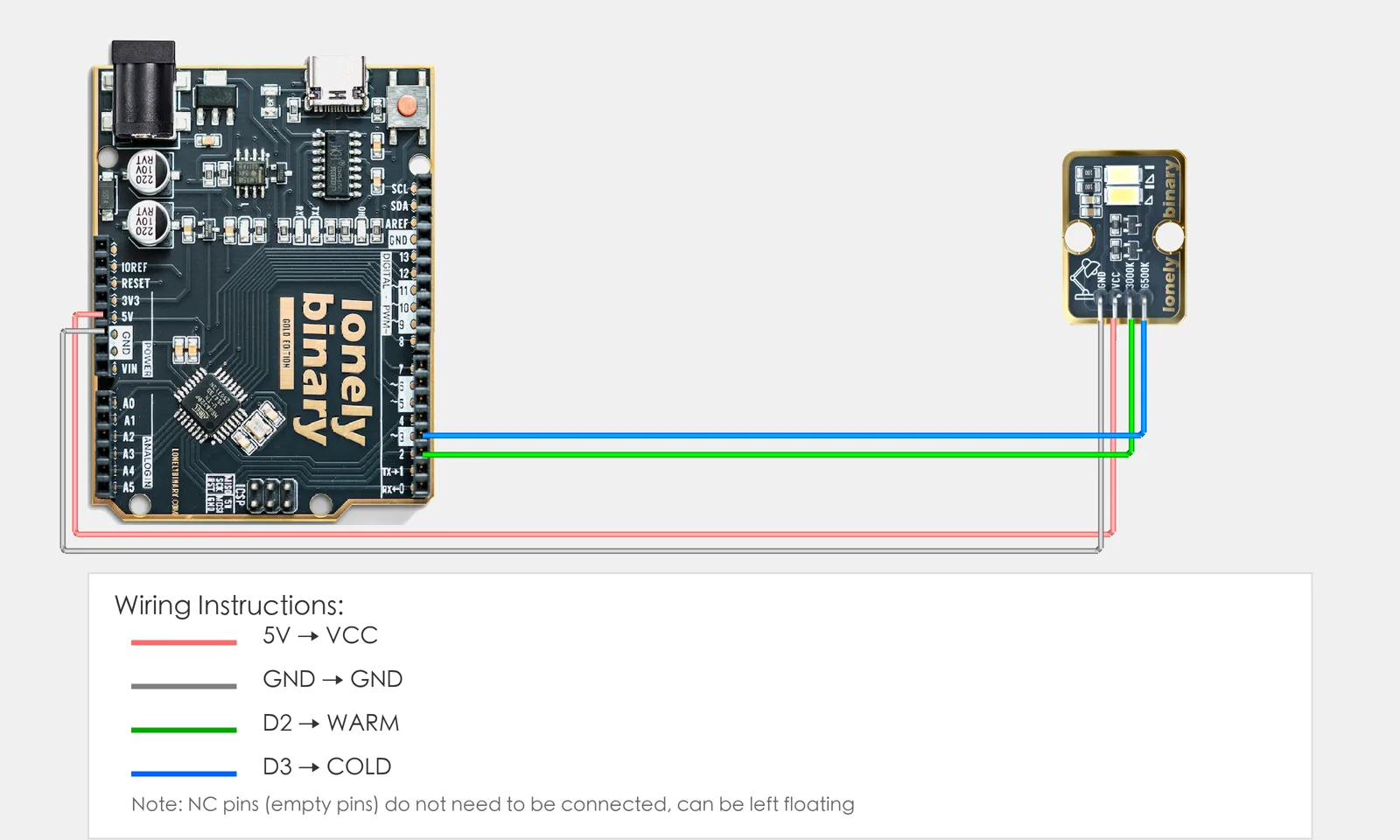
Connect TK95 Extreme Bright Dual LEDs to Arduino (each LED on a PWM pin):
- GND → Arduino GND
- 3000K → Arduino D2 (PWM, warm white)
- 6500K → Arduino D3 (PWM, cool white)
- NC leave unconnected
2. New sketch
- Arduino IDE: File → New (or Ctrl/Cmd + N) to create a blank sketch
- Confirm board and port are selected (same as Lesson 01)
- Type the code below into the default
setup()andloop()yourself
3. Program structure
Same as last lesson: two fixed blocks setup() and loop().
setup(): Tell the board “D2, D3 for LEDs (PWM)”; start serial; runs once.loop(): Keep repeating “warm on → cool on → both on (mixed) → repeat”.
Two PWM channels, one per LED; you’ll see warm, then cool, then both for mixed color temperature.
4. Code to write
Type the code below into setup() and loop() (do not copy-paste; typing it yourself helps you remember):
// Dual LEDs: warm D2, cool D3; PWM each; mix ratio = color temperature
#define WARM_PIN 2   // 3000K warm white
#define COLD_PIN 3   // 6500K cool white

void setup() {
  pinMode(WARM_PIN, OUTPUT);   // D2 warm PWM
  pinMode(COLD_PIN, OUTPUT);   // D3 cool PWM
  Serial.begin(9600);
  Serial.println("Extreme bright dual LED program started");
}

void loop() {
  analogWrite(WARM_PIN, 255);   // Warm only
  analogWrite(COLD_PIN, 0);
  Serial.println("Warm white");
  delay(2000);
  analogWrite(WARM_PIN, 0);    // Cool only
  analogWrite(COLD_PIN, 255);
  Serial.println("Cool white");
  delay(2000);
  analogWrite(WARM_PIN, 128);   // Both half; mixed
  analogWrite(COLD_PIN, 128);
  Serial.println("Mixed");
  delay(2000);
}
Program notes
Overall idea: Two LEDs on PWM pins; use analogWrite 0–255 for each. One channel 255 = pure warm or pure cool; both on = mix; different ratios give different color temperature (more warm = yellower, more cool = bluer).
| Code | In this lesson |
|---|---|
analogWrite(WARM_PIN, 255) | Warm full; 0 = off |
analogWrite(COLD_PIN, 128) | Cool half; with warm = mixed |
| Color temperature | Ratio of the two channels sets perceived color; try different values |
5. Hands-on
- After entering the code, click Verify (✓) to compile
- Click Upload (→) to upload to the board
- Watch TK95: warm white, then cool white, then mixed, then repeat
- Try yourself: change the two brightness values to get different color temperatures
Expected result: As in the figure.
Proceed to Lesson 38.
Edit this page — content/guides/tinkerblock-workshop/37-extreme-bright-dual-leds.mdx
Questions about this product
See what other owners have asked, and read their solutions.
Dual Bright LEDs
Loading discussions…
Discuss this article
Ask about this page. The answer stays here, on the page it belongs to, for whoever hits the same wall next.