Why six sizes
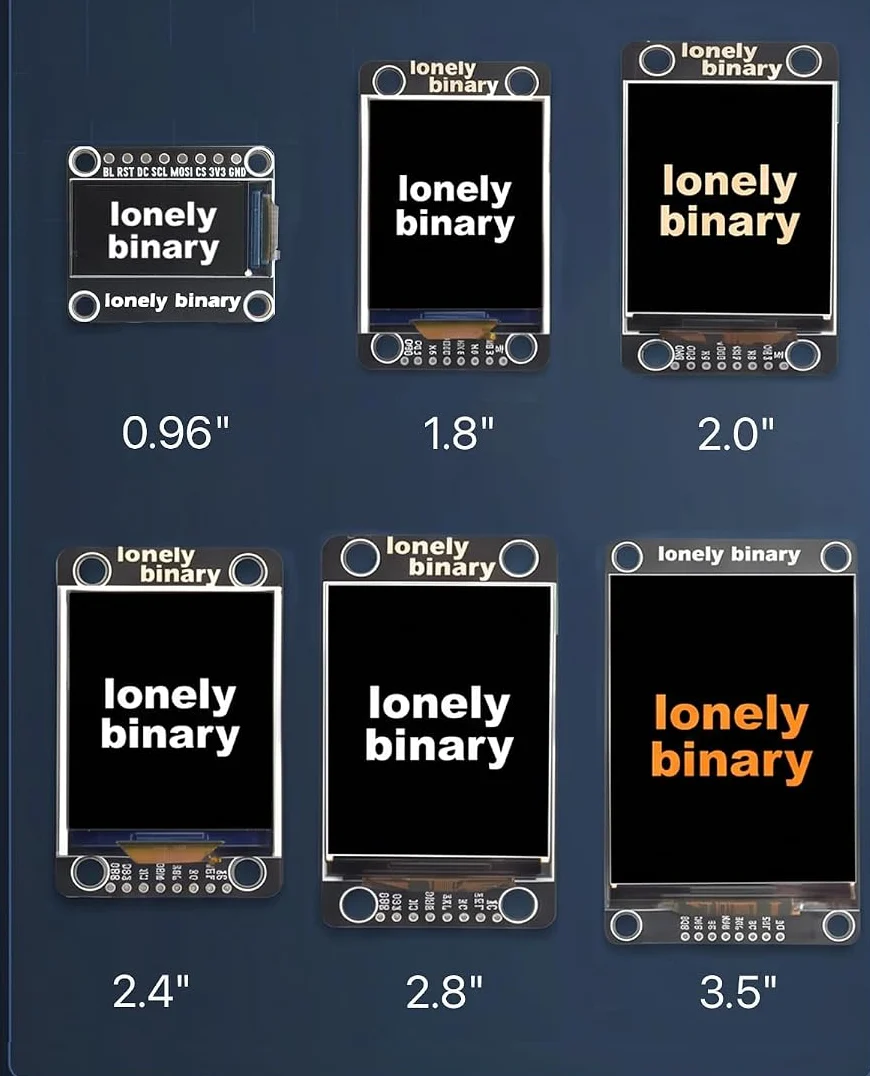
Six screens from 0.96 to 3.5 inches, and three of them have exactly the same number of pixels. Choosing between those three is choosing how big a pixel is, not how many you get — and only the largest panel adds any.
Six, because the right size is a thing you find out
A display is the one component whose specification you cannot read your way to. Pixels tell you nothing about whether a number is legible from the sofa, and a diagonal in millimetres tells you nothing about whether your enclosure has room. The only way to know is to put the panel where it is going to live and look at it.
That is what a kit of six is for. Prototype on whichever one is nearest, decide by eye, and the swap costs you nothing — the panels are interchangeable in a way the rest of this book spends its time explaining.
Three of them are the same panel
Step the control through 2.0, 2.4 and 2.8 inches and the resolution does not move: 240 × 320 on all three. They are one controller and one picture on three sizes of glass.
So the choice between them is a choice about pixel size. The 2.0 inch has the smallest pixels in the kit — text at the same font size looks printed rather than drawn, and a chart has room for gridlines. The 2.8 inch has the largest, which is what you want when the thing is going to be read from across a room and not from a desk.
Only the 3.5 inch adds pixels: 320 × 480 is twice the picture of the 2.8 inch. It also takes twice as long to redraw, which is a real number and gets its own article.
And one of them is not like the others
The 0.96 inch is the odd panel in more ways than its size. It is 80 × 160, a strip rather than a screen, and it is the only one in the kit whose backlight is wired the opposite way round from the rest. The library handles that; a driver you write yourself will not, unless you know.
It is the right panel for one reading — a temperature, a battery bar, a state word — in a space where nothing bigger fits.
What none of them do
There is no touch on any panel in this kit, and no microSD socket on any board. Both turn up on displays that look like these, and their absence is why the wiring is eight wires instead of fourteen. If you need touch, you need a different panel; nothing here can be made to have it.
When it does not work
The 2.4 inch. It is large enough to read across a desk, its 240 by 320 is the resolution most example code on the internet assumes, and a full redraw is short enough that a beginner's habit of clearing the screen every loop does not look broken yet. Move up or down once you know what you are building.
No — it is the same 240 by 320 on bigger glass, so it is visibly coarser up close and easier to read from further away. The three middle panels are one picture at three physical sizes. If you want sharp, the 2.0 inch has the smallest pixels in the kit.
Same glass, described the other way round. The library treats the 0.96 inch as a portrait panel 80 pixels wide and 160 tall, and rotating it in software gives you the landscape strip the listing photographs. Neither number is wrong; only one of them is the panel's own orientation.
None of the six. There is no touch controller on any board in this kit and no connector for one, and there is no microSD socket either. They are display-only panels, which is part of why the wiring is eight wires rather than fourteen.
Nine cables for six screens, four strips of header, and why the spares are deliberate.
What is in the box →Edit this page — content/books/spi-tft-kit/why-six-sizes.mdx
Questions about this product
See what other owners have asked, and read their solutions.
SPI TFT LCD Display Kit, 6-Pack from 0.96 to 3.5 inch
Loading discussions…
Discuss this article
Ask about this page. The answer stays here, on the page it belongs to, for whoever hits the same wall next.