This lesson uses: Arduino UNO R3 board, TinkerBlock TK01 XL LED module (or TK02/TK03), jumper wires (or breadboard). Learn custom functions; outcome: wrap “on 200 ms, off 200 ms” in myBlink(), call it from loop, LED blinks at a fixed rhythm.
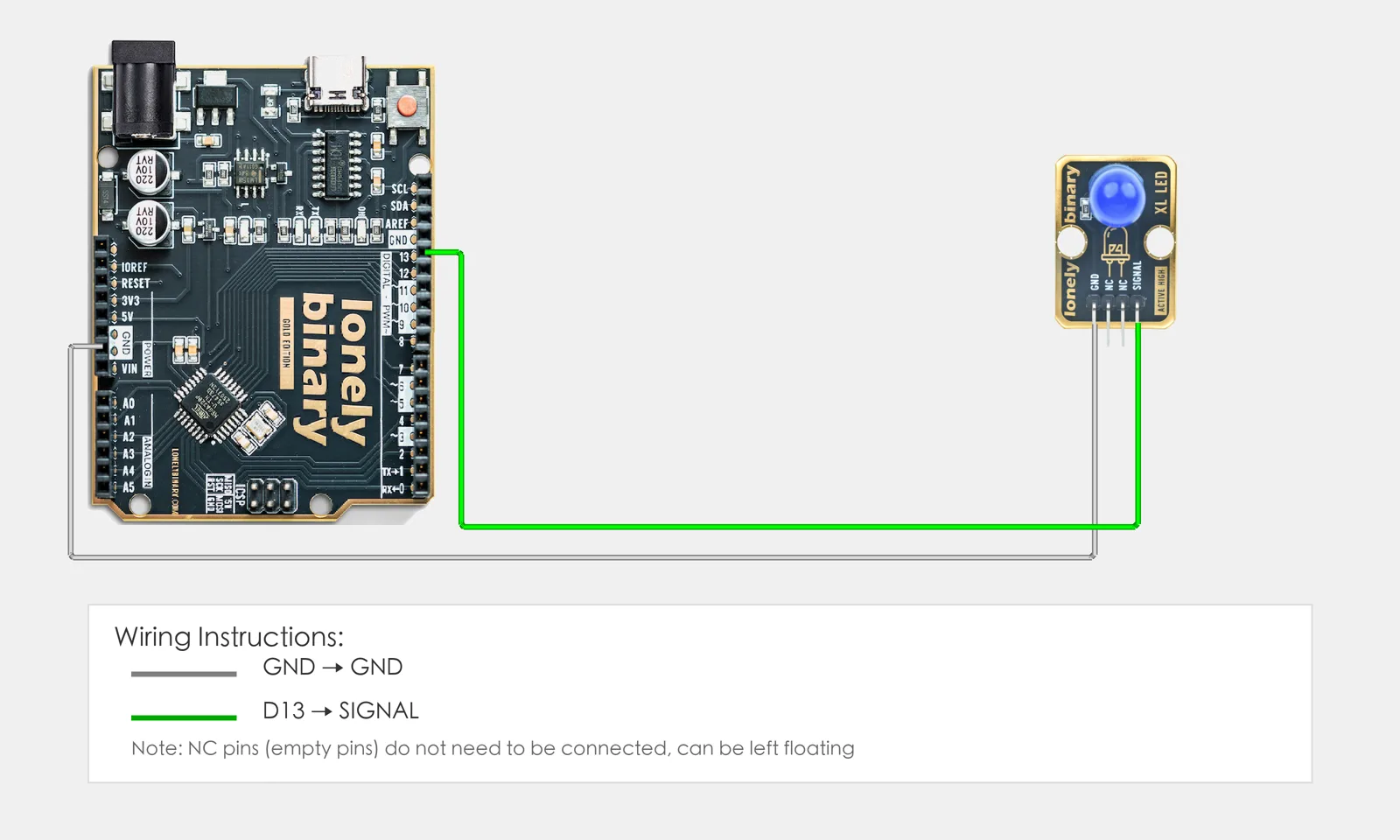
1. Wiring
Reuse a previous module, e.g. TK01 XL LED:
- GND → Arduino GND
- SIGNAL → Arduino D13
- NC leave unconnected
2. New sketch
- Arduino IDE: File → New (or Ctrl/Cmd + N) to create a blank sketch
- Confirm board and port are selected (same as Lesson 01)
- Type the code below into the default
setup()andloop()yourself
3. Program structure
Same as last lesson: two fixed blocks setup() and loop(). We also define our own function.
- Custom function: Wrap repeated code in a named block and call it when needed
setup(): Tell the board “pin 13 for LED”; runs onceloop(): Call the custom function so the LED blinks
One “blink” is inside myBlink(); loop just calls it and the LED blinks at a fixed rhythm.
4. Code to write
Define the function before setup() and loop(), then call it inside them:
#define LED_PIN 13   // LED on D13

// Custom function: blink once
void myBlink() {
  digitalWrite(LED_PIN, HIGH);   // On
  delay(200);                    // 200 ms
  digitalWrite(LED_PIN, LOW);    // Off
  delay(200);                    // 200 ms
}

void setup() {
  pinMode(LED_PIN, OUTPUT);   // D13 for LED
}

void loop() {
  myBlink();   // Call custom function: blink once
  delay(500);  // 500 ms before next blink
}
Program notes
Overall idea: Put the four steps “on → delay → off → delay” inside myBlink(); in loop() call myBlink() to run them. void means no return value; call it multiple times for more blinks, or later change to blink(int n) with a parameter.
| Code | In this lesson |
|---|---|
void myBlink() { ... } | Define a function with no return value; body runs when called |
myBlink() | Call the function; runs “on 200 ms, off 200 ms” once |
| Encapsulate repeat logic | When the same code is needed in several places, a function keeps it in one place |
5. Hands-on
- After entering the code, click Verify (✓) to compile
- Click Upload (→) to upload to the board
- Watch TK01: one quick blink, pause, then another blink, repeat
- Try yourself:
- Call
myBlink()several times inloop(), e.g.myBlink(); myBlink(); myBlink(); - Add
myBlinkSlow()that blinks slower - Try a function with a parameter, e.g.
blink(int times)to blink that many times
- Call
Expected result: As in the figure.
Proceed to Lesson 24.
6. Common issues
| Symptom | What to do |
|---|---|
| Compile error | Check function form: void name() { ... }, brackets and braces |
| Function never runs | Make sure you call it inside loop() |
Edit this page — content/guides/tinkerblock-workshop/23-custom-functions.mdx
Questions about this product
See what other owners have asked, and read their solutions.
This page covers several products. Choose yours to see the right discussions.
Discuss this article
Ask about this page. The answer stays here, on the page it belongs to, for whoever hits the same wall next.