Seven segments and a dot
A digit on this display is not a digit. It is eight separate lights with letters for names, and every byte in the rest of this handbook is those eight lights written down.
Eight lights, seven of them bars
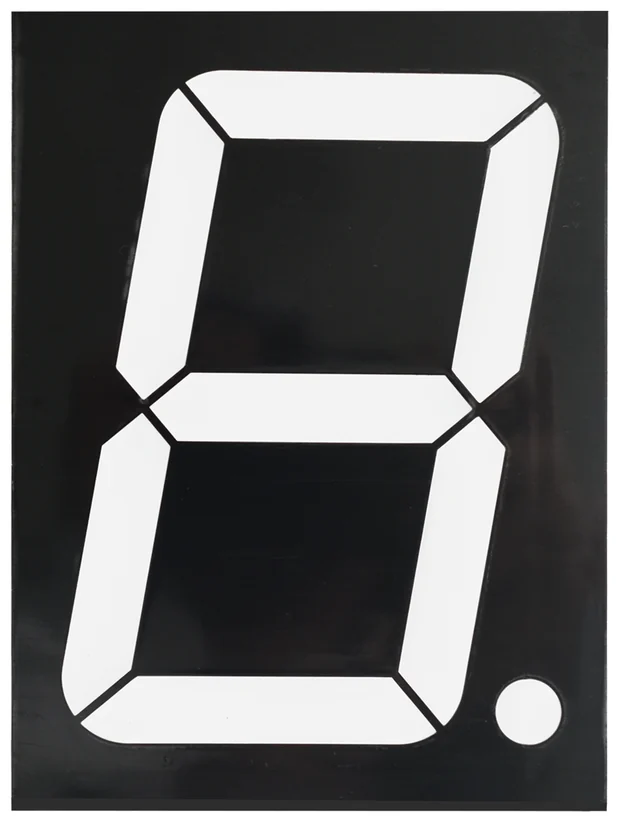
The display in your hand has eight lights in it. Seven are bars arranged around the outline of an 8, and the eighth is the round dot at the bottom right. Nothing joins them. Each one can be on or off on its own, and the shapes we call digits are just the ten combinations that happen to look like numbers.
They have names, and the names are the same on every seven-segment display ever made: A across the top, B and C down the right, D across the bottom, E and F up the left, G through the middle, and DP for the point.
Press the letters and you will find what the ten digits actually cost. A 1 is two bars. An 8 is all seven. A 6 and a 5 differ by exactly one bar, which is why a single broken segment turns one into the other and is worth knowing when a display starts showing the wrong number.
Why eight and not ten
Eight is not an accident. Eight lights fit in one byte, one bit each, and a
byte is the unit that everything downstream of here moves in: the shift
register on the back of the module holds eight bits, shiftOut() sends eight
bits, and the table in the sketch is ten bytes long because there are ten
digits.
So the chain of ideas in this handbook is short: you write a number, your sketch turns it into a byte, the byte goes down one wire, and eight bars light.
What the board already knows
Nothing. The module does not know what a 3 is. It switches eight lights on and off in whatever pattern arrives, and every pattern is equally valid to it — including the 246 that are not digits.
That is a feature more often than it is a nuisance. A minus sign is segment G
on its own. A degree symbol is A, B, F and G. Two modules showing E and 0
is a perfectly good error message.
When it does not work
Send 0xFF, which is every segment plus the point. If exactly one stays dark it is that segment's line, not your table — check the module against another one in the box before you suspect the code.
It is not. The point is at the bottom right of the digit when you are looking at the front. On the back, where the silkscreen prints the segment letters, everything is mirrored and the point appears on the left, which catches people comparing the two pictures.
Some of them. A, b, C, d, E and F all have shapes that seven bars can make, which is why hexadecimal on a 7-segment display is a solved problem. K, M, W and X do not, and no table will save you.
A bar this long is several LEDs in a row, and their voltages add up past anything your board has.
Why it needs 12 volts →Edit this page — content/books/4-inch-7-segment/seven-segments-and-a-dot.mdx
Questions about this product
See what other owners have asked, and read their solutions.
4″ 7-Segment LED Display with 74HC595
Loading discussions…
Discuss this article
Ask about this page. The answer stays here, on the page it belongs to, for whoever hits the same wall next.