One plug, two rails
A breadboard has no power of its own. These adapters plug into both pairs of power rails at one end and feed them from a USB-C charger. Three boards, three ways of making the voltage, and one way round that all of them share.
What it does
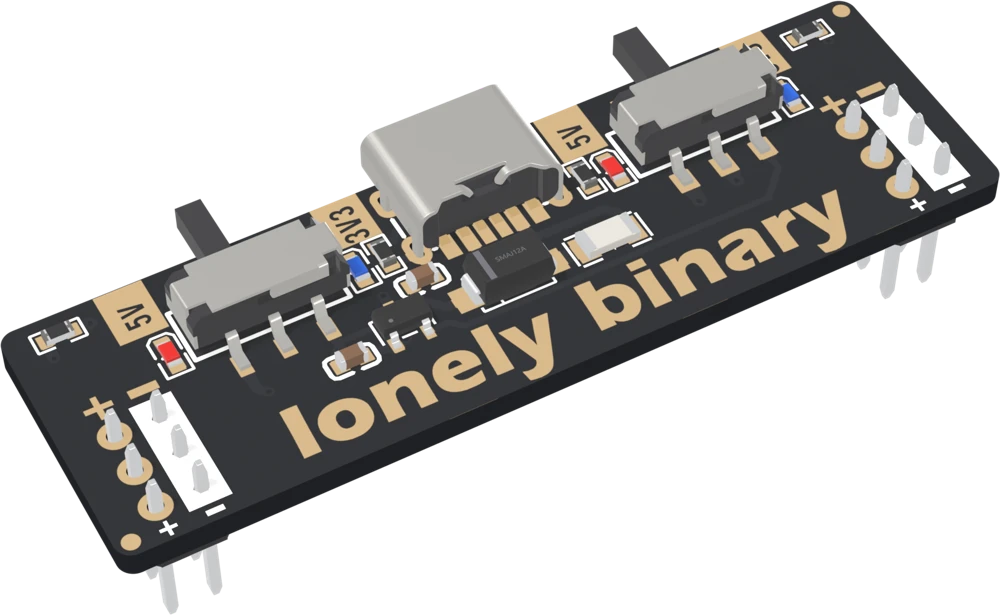
A solderless breadboard has a pair of power rails down each long edge, and nothing in them until you put something there. An adapter sits across one end of the breadboard with a block of pins in each pair of rails, takes 5 V from a USB-C charger, and puts a voltage on both pairs at once.
Every board in the family does that part the same way. What differs is the voltage it makes.
Three boards
The standard gives 5 V or 3.3 V, chosen with a slide switch, one switch per side of the breadboard. The 5 V is the USB supply itself; the 3.3 V comes from a small regulator on the board.
The step-down gives any voltage from 1.25 V up to about 3.5 V, set with a small trimmer on each side. It is for parts that want 1.8 V or 2.5 V, or a 3.3 V that you want to lower a little and watch what happens.
The booster gives anything from about 4.3 V up to 28 V, again one trimmer per side. It is for a 9 V or 12 V part — a relay, a small fan, a buzzer that wants more than 5 V — on a breadboard fed from USB.
Each side is separate. On any of the three, the left pair of rails and the right pair can be at different voltages, and the − rails on both sides are the same ground.
What they all share
Between the USB-C socket and the voltage-making part, all three boards have the same two components: a resettable fuse that holds half an amp, and a diode that stops current flowing back into your charger. That half-amp fuse is the limit on everything the board can deliver, whichever board it is and whatever the back of it says.
The book is in that order. The first chapter is the part all three share: which way round the board goes, and what the fuse and diode do. Then one chapter per board. The last chapter puts an ESP32 on the rail to watch it, and lists what to measure when the rail is wrong.
When it does not work
The standard. Set a side to 5V and wire that rail to the dev board's 5V or VIN pin, and the dev board's own regulator makes its 3.3 V. Feeding a Wi-Fi board from the standard's 3.3 V side is the one arrangement to avoid: the 3.3 V regulator there is rated for 200 mA and Wi-Fi bursts pull more.
Yes, one at each end, as long as their + rails are not joined. On a full-size breadboard the rails often run the whole length in one piece, so two adapters on the same rail are two supplies fighting over one wire. Check with a meter that the rail is split in the middle before relying on it.
No. Any cable that charges a phone will do. Every board has the two 5.1 kΩ resistors a USB-C charger looks for before it switches its 5 V on, so a USB-C to USB-C cable works as well as USB-A to USB-C.
No. Nothing on these boards talks to the computer. The USB-C socket is a six-contact power-only type — power, ground and the two CC lines — with no data contacts at all, so a computer sees nothing plugged in.
The one thing on these boards that can damage a part, and how to check it in ten seconds.
Which way round it goes →Edit this page — content/books/bbpwd/one-plug-two-rails.mdx
Questions about this product
See what other owners have asked, and read their solutions.
This page covers several products. Choose yours to see the right discussions.
Discuss this article
Ask about this page. The answer stays here, on the page it belongs to, for whoever hits the same wall next.