Check the 16 MB and the 8 MB
One sketch that reports what the chip actually has, and the two menu rows that make a 16 MB board behave like a 4 MB one. If the IDE says four megabytes, nothing is broken — the partition table is describing a smaller chip.
Two claims worth checking
The board is sold on two numbers and both of them can be made to disappear from a menu. It is worth spending five minutes proving them once, so that when a sketch will not fit or a camera buffer will not allocate you already know which of the two you are short of.
Upload the sketch below and read the five lines it prints.
Why it says 4 MB
The commonest surprise on this board: Flash Size reports 16 MB and there is
still nowhere to put a large sketch. Those are two different facts, kept in two
different menu rows.
ESP.getFlashChipSize() still reports the real 16 MB — the shortfall only shows up as a sketch that will not fit and a filesystem that fills early. Change Flash Size and Partition Scheme; changing one is the usual half-fix.The chip is 16 MB whatever you choose — ESP.getFlashChipSize() reads it from
the chip itself and always has. What the partition scheme decides is how that
space is described: where the bootloader sits, how much your app may have,
how much is left for files. The default scheme describes a 4 MB chip, and a
description that stops at 4 MB makes the rest unaddressable.
So the fix is two rows, not one:
- Flash Size →
16MB (128Mb) - Partition Scheme →
16M Flash (3MB APP/9.9MB FATFS)
Changing only the first is the usual half-repair, and it produces exactly the symptom above.
Why it says 0 MB of PSRAM
One row, one value: PSRAM must be OPI PSRAM. The 8 MB on an N16R8 is
octal-interface, and with any other setting the core never initialises it — so
ESP.getPsramSize() truthfully reports zero, on a board with eight megabytes
soldered to it.
The other half of that setting is ps_malloc. Ordinary malloc gives you
internal SRAM and will not touch PSRAM; the sketch below allocates a megabyte
explicitly, because a size the chip reports and a block you can actually get
are two separate claims.
Asking the chip directly
If you want an answer that does not depend on any Arduino setting at all, ask
the ROM. esptool talks to the bootloader over the same cable:
pip install esptool

# swap in your own port: /dev/cu.wchusbserial10, COM3, /dev/ttyUSB0
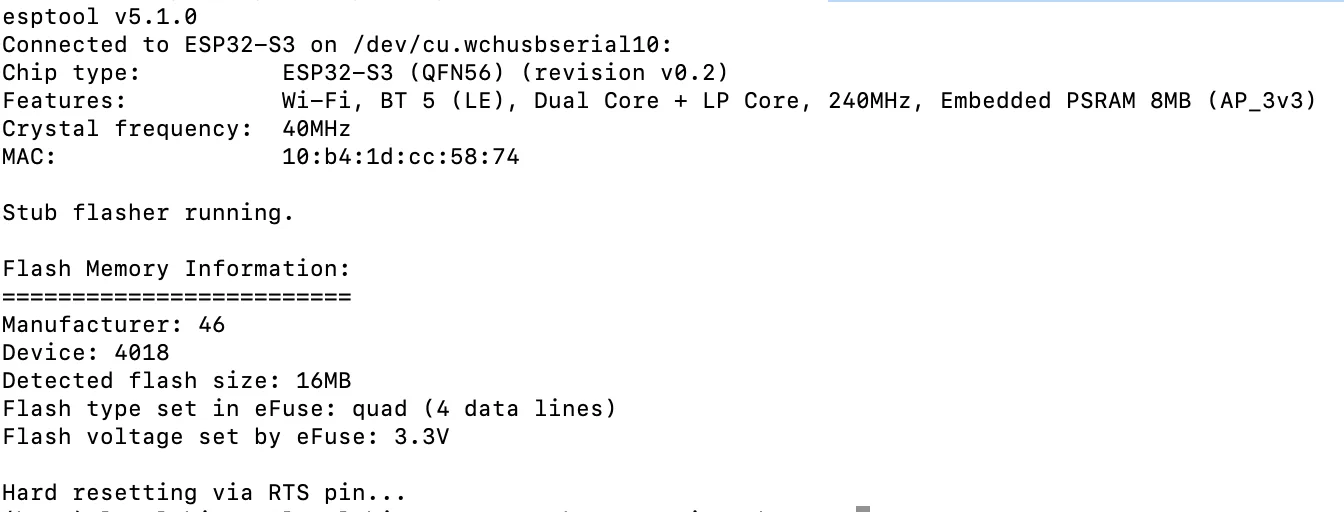
esptool --chip esp32s3 --port /dev/cu.wchusbserial10 flash-id
Detected flash size: 16MB from that command is the chip talking, with no
partition table and no menu row in the way. It is the check to run when you
suspect the board rather than the settings.
chip-id on the same port answers the other half:
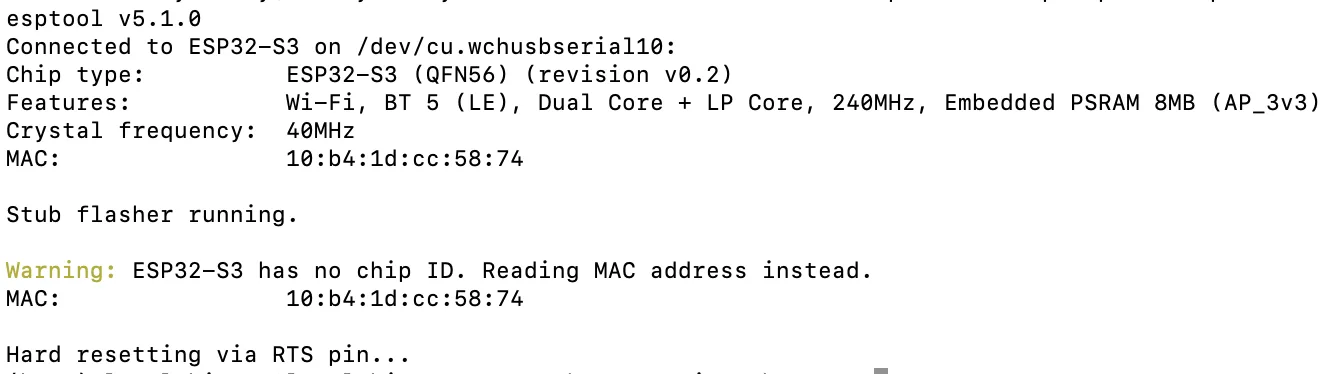
That PSRAM line comes from the chip's own eFuses rather than from anything you
set, which makes it the quickest way to separate the board does not have it
from the menu is not asking for it. It is still not the same claim the sketch
makes: an eFuse says the memory is fitted, and only ps_malloc says you can
have a megabyte of it.
The chip-id output reports a MAC address rather than a separate serial number,
because the ESP32 family has no dedicated chip-ID register. That is not a fault;
it is how the tool identifies these parts.
The code
Prints flash, PSRAM and heap, then allocates a megabyte of PSRAM and gives it back — because a size that is reported and a size that can be allocated are two different claims.
/*  Lonely Binary ESP32-S3 N16R8 — memory report
    Tools ▸ Flash Size 16MB (128Mb) · PSRAM OPI PSRAM
            Partition Scheme 16M Flash (3MB APP/9.9MB FATFS)  */

void setup() {
  Serial.begin(115200);
  delay(1500);

  Serial.printf("flash chip    %.1f MB\n", ESP.getFlashChipSize() / 1048576.0);
  Serial.printf("flash speed   %u MHz\n",  ESP.getFlashChipSpeed() / 1000000);
  Serial.printf("sketch space  %.1f MB\n", ESP.getFreeSketchSpace() / 1048576.0);
  Serial.printf("psram         %.1f MB\n", ESP.getPsramSize() / 1048576.0);
  Serial.printf("free heap     %.1f kB\n", ESP.getFreeHeap() / 1024.0);

  // Reporting a size is not the same as being able to use it.
  void *block = ps_malloc(1024 * 1024);
  Serial.println(block ? "psram: 1 MB allocated and freed"
                       : "psram: allocation FAILED — check PSRAM is set to OPI");
  free(block);
}

void loop() {
  delay(1000);
}
getFreeHeap counts internal SRAM only. Wi-Fi and BLE take a large bite of it before setup() runs, so the number you see here is what is left for your program, not what the chip has.
When it does not work
Flash Size is right and Partition Scheme is still on a 4 MB default. They are two separate rows and they have to move together — the chip size says how big the chip is, the partition scheme says how it is divided, and only the second one decides how much your sketch may have.
PSRAM is not set to OPI PSRAM. The 8 MB on an N16R8 is octal-interface, so quad or disabled finds nothing at all. This is a menu row, not a fault — a board with genuinely dead PSRAM is rare enough that we have not seen one.
Something has already taken it — a camera driver or a display buffer allocated in setup before this ran. Print ESP.getFreePsram() as well as the size; a large gap between them is the answer.
It is. Wi-Fi and BLE reserve a substantial block before your code starts, and the figure printed here is what is left over. Watch how it moves rather than what it is — a number that falls a little on every loop is a leak.
Everything above assumed the board appears and takes an upload. The next chapter is what to do on the evening it does not.
No port, or no upload →Edit this page — content/boards/esp32-s3/check-the-memory.mdx
Questions about this product
See what other owners have asked, and read their solutions.
ESP32-S3 Gold Edition (N16R8)
Loading discussions…
Discuss this article
Ask about this page. The answer stays here, on the page it belongs to, for whoever hits the same wall next.