No serial output
The upload succeeds, the board runs, and the Serial Monitor stays blank. One menu row decides which of the two sockets Serial.println leaves by, and if it disagrees with your cable you see nothing at all.
One row, two roads
Serial on an ESP32-S3 is not a fixed thing. It is either the chip's own USB
peripheral — the right-hand socket — or UART0, which runs to the CH340 and the
left-hand one. Tools ▸ USB CDC On Boot is what chooses, and it is compiled
into your sketch rather than applied by the Monitor.
Two sockets and two settings make four combinations. Two of them are silent.
Serial out of the chip’s own USB on the right; Disabled sends it to UART0, which is the CH340 and the socket on the left. The ROM boot log always comes out of UART0 — which is why the left socket can show a banner and then stay silent while the right one shows everything.That is the whole failure. Nothing is broken in either silent case: the sketch runs, prints on schedule, and everything it prints leaves by the socket your cable is not in.
| Cable in | USB CDC On Boot | Result |
|---|---|---|
| USB (right) | Enabled | You see everything |
| USB (right) | Disabled | Silence — output went to UART0 |
| UART (left) | Disabled | You see everything |
| UART (left) | Enabled | Silence — output went to the native USB |
Change the row, upload again, and press RESET. Changing it without re-uploading changes nothing, because the choice is baked into the binary.
Why the boot log is not a counter-example
People reasonably conclude the sketch is not running, because something appeared: a burst of characters at reset, sometimes a readable banner about the boot mode. Then nothing.
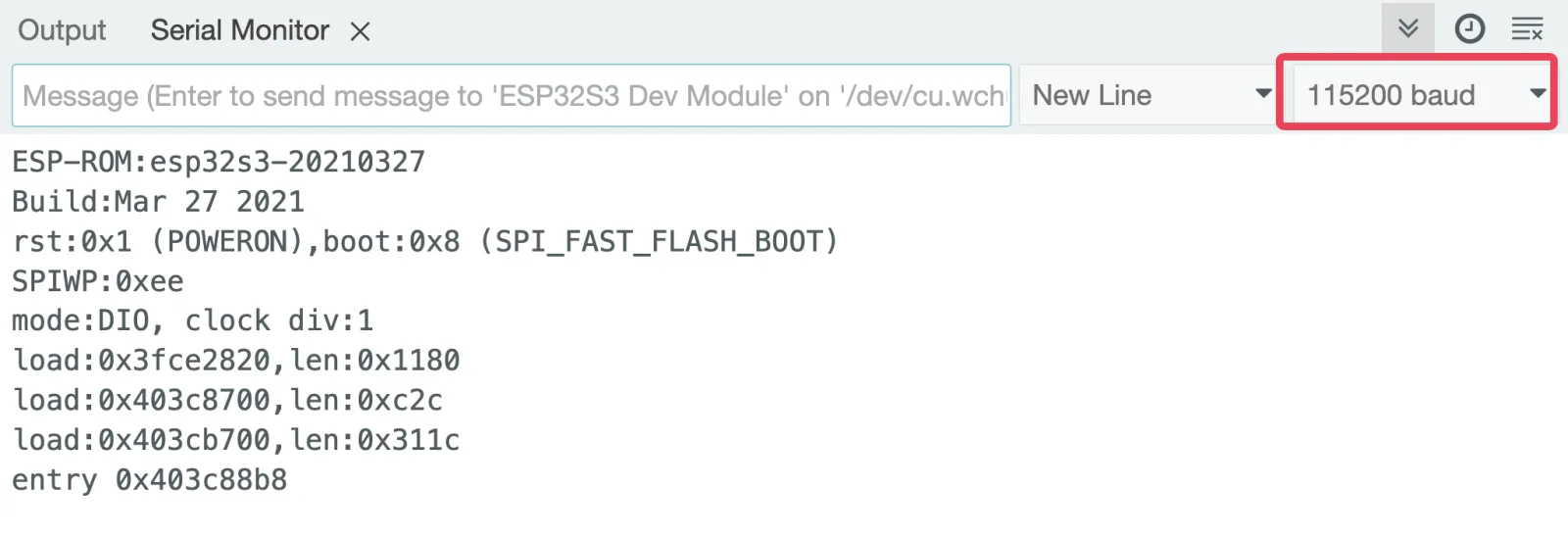
That burst is the ROM bootloader, which prints to UART0 before any of your code or any of your settings exist. It comes out of the left-hand socket always. Your own output follows the setting.
So the two together are diagnostic rather than confusing: boot log yes, your lines no means you are on the left socket with CDC enabled. Flip the row.
Which socket to prefer
Once it works, the choice is about what you are debugging.
- The right-hand socket for everyday work. Faster, no driver, and one cable.
- The left-hand socket for anything that crashes, sleeps or resets. The native port lives inside your firmware, so it disappears at exactly the moment you most want to read the last line. The CH340 does not care what your sketch did.
That is also the honest answer to "which port is better": neither, and knowing why is the useful part.
The code
Upload this with USB CDC On Boot set to match your socket. If nothing appears, the setting and the cable disagree — nothing in the sketch can fix that.
/*  Lonely Binary ESP32-S3 N16R8 — is anyone listening?
    Right-hand USB socket  → USB CDC On Boot: Enabled
    Left-hand UART socket  → USB CDC On Boot: Disabled   */

void setup() {
  Serial.begin(115200);
  delay(1500);              // let the native USB port enrol

#if ARDUINO_USB_CDC_ON_BOOT
  Serial.println("built for the USB socket (right)");
#else
  Serial.println("built for the UART socket (left)");
#endif
}

void loop() {
  Serial.printf("up %lu s\n", millis() / 1000);
  delay(1000);
}
The delay after Serial.begin is not superstition on the native port. The chip has to enrol as a USB device and your computer has to open it, and anything printed before that happens is printed into a port nobody is listening to yet.
When it does not work
Those are two different paths. The ROM boot log always comes out of UART0 and the left-hand socket, before any setting of yours applies; your Serial.println follows USB CDC On Boot. Seeing one and not the other is the clearest possible sign that the setting and the socket disagree.
On the native port, everything printed before your computer opens the port is gone. Add a delay after Serial.begin, or wait for the port — while (!Serial) — if you cannot afford to lose anything.
The baud rates do not match. The Monitor and Serial.begin have to agree, and 115200 is the convention here. Garbage at the very start and clean text afterwards is different, and normal — it is the ROM log at its own baud.
On the right-hand socket the port is created by your firmware, so a crash takes the port down before it can print why. Move to the left-hand socket for anything you expect to crash; that port belongs to the CH340 and survives.
The last failure in this chapter, and the only one that is a repair rather than a setting.
The diodes behind the ports →Edit this page — content/boards/esp32-s3/no-serial-output.mdx
Questions about this product
See what other owners have asked, and read their solutions.
ESP32-S3 Gold Edition (N16R8)
Loading discussions…
Discuss this article
Ask about this page. The answer stays here, on the page it belongs to, for whoever hits the same wall next.