What you are holding
A small board with a lot on it, and a name that is two numbers. Here is what the ESP32-S3 does, what N16R8 buys you, and what is actually printed on the thing in your hand.
A computer that only ever runs your program
A microcontroller is a whole computer on one chip — processor, memory, peripherals — with one job. It has no operating system, no screen and nothing else competing for it. You flash a program in, and that program starts running about half a second after power arrives and keeps running until power stops.
That is the useful difference from the machine you are reading this on. A laptop is general and unpredictable: it schedules, swaps and updates. A microcontroller does the same thing on the same schedule every time, on a tenth of a watt, which is why one is inside your microwave and your car and not a laptop.
The ESP32-S3 is a large example of the type. Two cores at 240 MHz, Wi-Fi and Bluetooth LE on the chip itself, more GPIO than you will use, and — on this board — more memory than most microcontrollers have any idea what to do with.
What N16R8 means
Two numbers, both memory, and they are the reason this board costs what it does. Everything on this figure is on your board right now.
Three memories with three jobs, and only one of them survives a power cut. That last row surprises people: a reading you store in a variable is gone the moment the board resets. Keeping something across a reset means writing it to flash, deliberately.
The 8 MB of PSRAM is what makes camera and display work possible on this board — a single 800×600 colour frame is over a megabyte, which does not fit in the 512 kB of SRAM at all.
What is on the board
Hold it with the antenna at the top and the two USB-C sockets at the bottom. Turned on its side it looks like this, and every pin is numbered beside its own pad:
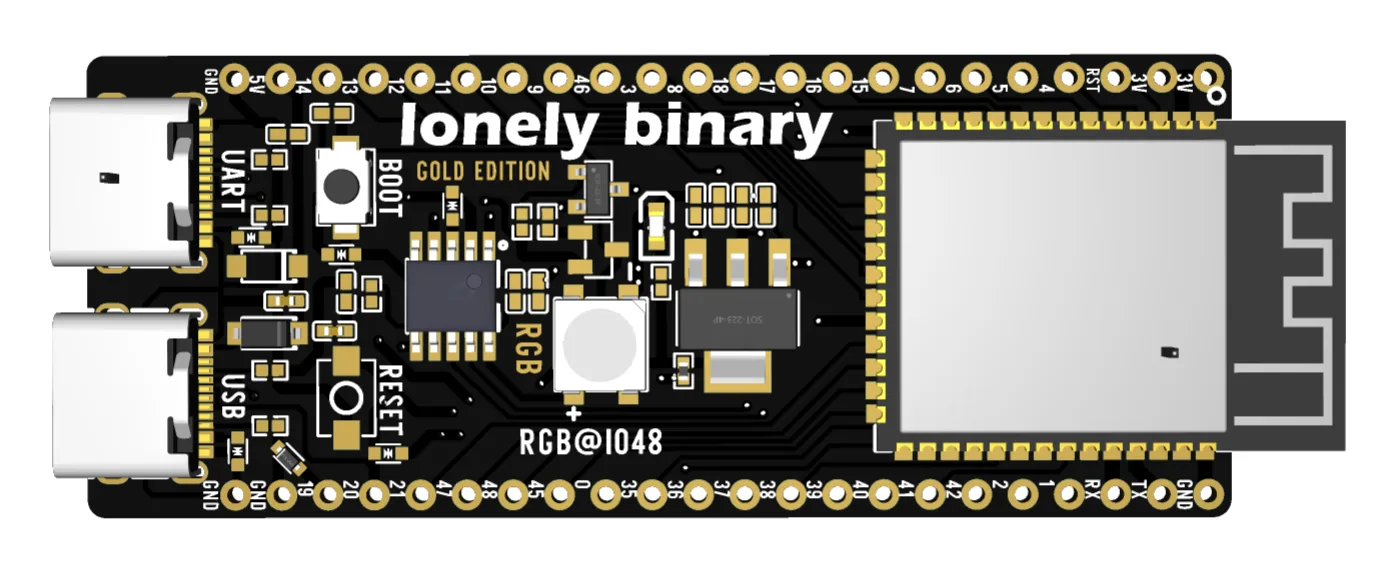
| What you see | What it is |
|---|---|
| The silver can at the top | The ESP32-S3 module: chip, flash, PSRAM and the antenna |
| A single LED, marked RGB@IO48 | An addressable RGB LED on GPIO 48. Not three pins — one |
| Two buttons, BOOT and RESET | Together they force the chip into download mode |
| Two USB-C sockets, UART left and USB right | Two different ways in, and the subject of the next article |
| Two rows of gold pads | GPIO, 3V3, 5V and ground, numbered on both faces |
The top row of that table is the only one you cannot look inside. Lift the shield off the module and three parts account for everything the row names:
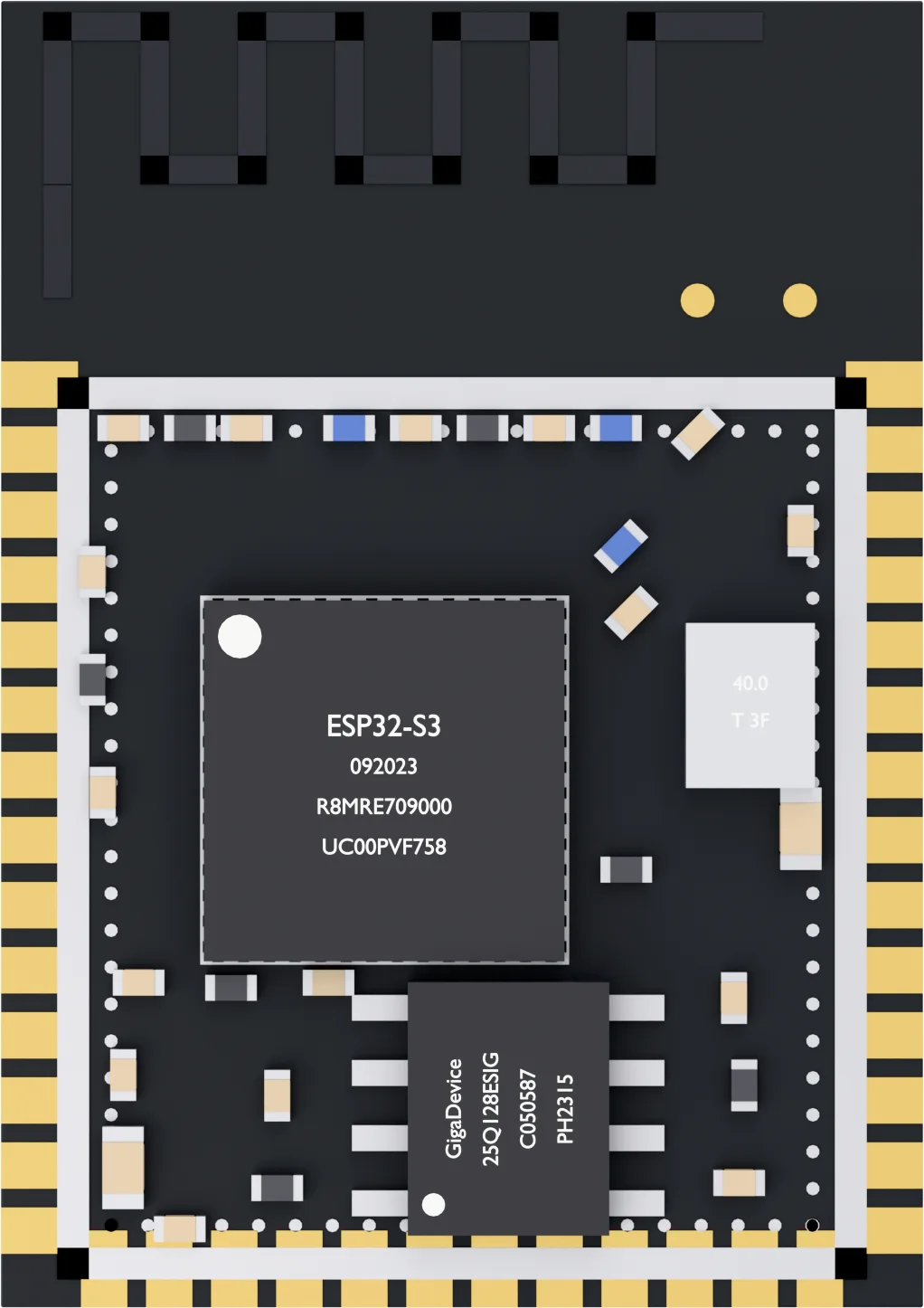
The numbers on the back are the same pins as the front, mirrored. So is the lettering: USB reads on the left when you turn the board over, which catches everybody once.
Against an Arduino UNO
If the UNO is your reference point, this is the honest comparison:
| Arduino UNO R3 | ESP32-S3 N16R8 | |
|---|---|---|
| Cores and clock | 1 × 16 MHz | 2 × 240 MHz |
| Program space | 32 kB | 16 MB |
| RAM | 2 kB | 512 kB + 8 MB PSRAM |
| Wi-Fi and Bluetooth | Add a module | On the chip |
| Logic level | 5 V | 3.3 V |
| Analogue in | 6 pins, dependable | 20 pins, less dependable |
The row that costs people parts is the fifth. This board is a 3.3 V device, and 5 V from an UNO-era sensor or shield on a GPIO pin is how a pin dies — sometimes immediately, sometimes three weeks later. If you are bringing 5 V hardware over, read logic levels first.
The row people are surprised by is the last. The ADC on an ESP32 is noisier and less linear than an UNO's, and no amount of code entirely fixes it.
What it is not good at
It is worth knowing the edges before you design around them. This is not a Raspberry Pi: there is no Linux, no HDMI, no Python-with-pip, and nothing that looks like a filesystem until you make one. It draws real current when the radio transmits — enough that a weak USB supply browns it out mid-connection. There is no DAC at all on an S3, so an analogue output means PWM and a filter, or an external part. There is no classic Bluetooth either, only BLE.
And the 8 MB of PSRAM is not free in pins: on an octal module like this one it uses GPIO 33 to 37. They are on the header, they look available, and they are not. When a pin misbehaves for no reason on this board, check that list before you check your wiring.
None of that matters for the next hour. Plug it in, get a port, blink the LED — and the rest of this book is the eight settings and three failures between you and that.
When it does not work
Slightly warm near the regulator is normal, especially over USB while Wi-Fi is running. Hot enough to be uncomfortable to hold is not — unplug it and check nothing is bridging 5 V or 3V3 to ground before you plug it in again.
Almost always the cable, and specifically a charge-only one. Before suspecting the board, try a cable you have moved a file with. If a cable that works on one socket does nothing on the other, read the diode article at the end of this book.
Check the silkscreen on the back. This book is written for ESP32-S3-DEVKITC-1 V1.6 with 16 MB of flash and 8 MB of PSRAM. An S3 with different memory works the same way apart from two menu rows; an ESP32, C3 or C6 is a different chip and the ESP32 book covers those.
The first thing people ask about this board, and the answer decides two menu settings and one driver. Worth reading before you plug anything in.
The two USB-C ports →Edit this page — content/boards/esp32-s3/what-you-are-holding.mdx
Questions about this product
See what other owners have asked, and read their solutions.
ESP32-S3 Gold Edition (N16R8)
Loading discussions…
Discuss this article
Ask about this page. The answer stays here, on the page it belongs to, for whoever hits the same wall next.