Drivers on macOS
Plug in and look at the port list before you download anything — recent macOS versions already carry a CH34x driver. If yours does not, it is one package, one permission and one restart.
Look before you download
Two of the three cases on a Mac need nothing installed at all: the right-hand socket never does, and recent macOS versions ship a CH34x driver that covers the left-hand one too.
So the first step is not a download. Plug the board into the socket you intend
to use, open Terminal, and run ls /dev/cu.*. A usbmodem or wchusbserial
entry means you are already finished.
If macOS asks "Allow accessory to connect?", allow it. On the models that ask, denying it produces a board that charges and is invisible, which looks exactly like a broken cable.
If there is no port
Check the Mac saw the device at all before blaming the driver: the Apple menu ▸ About This Mac ▸ System Report ▸ Hardware ▸ USB. A CH340-based board appears there as a USB-Serial controller whether or not a driver has claimed it.
- Nothing in the USB tree — the Mac saw no device. That is the cable or the socket, not the driver. Try a cable you have moved a file with.
- A device in the tree and no port in
/dev— now a driver is genuinely what is missing.
Then, and only then:
-
Download CH341SER_MAC from wch-ic.com/downloads/CH341SER_MAC_ZIP.html.
-
Unzip it and run
CH34xVCPDriver.pkg. -
Open System Settings ▸ Privacy & Security, scroll to the bottom, and Allow the blocked system extension. macOS will not load it until you do, and it does not nag you about it.
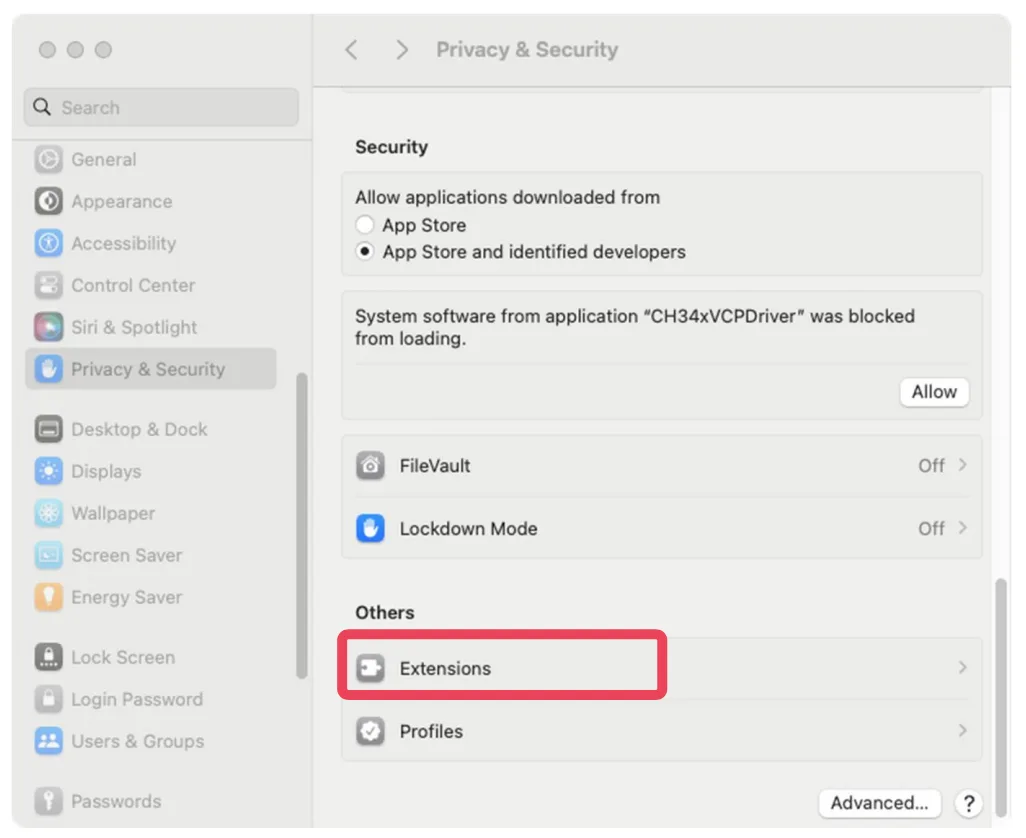
The blocked notice appears under Security and disappears again after a while. If it has already gone, the same extension is listed under Login Items and Extensions ▸ Driver Extensions. 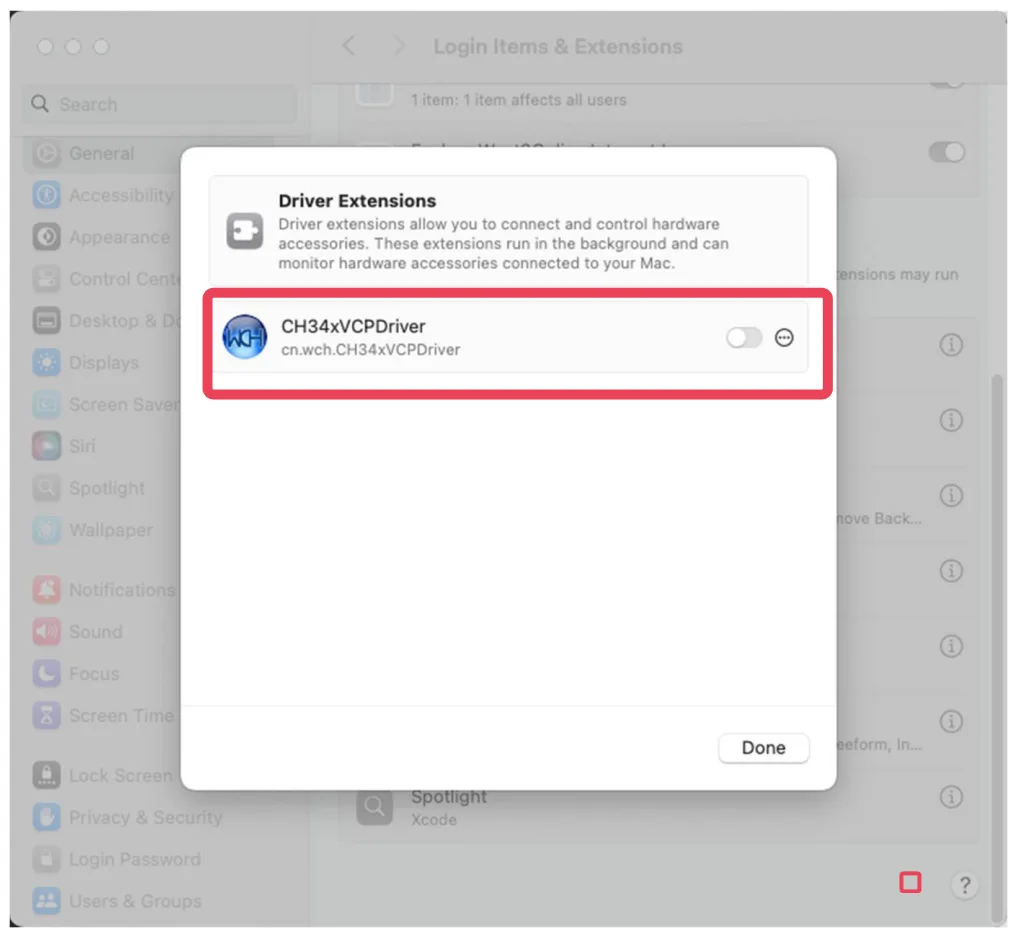
This is where the setting lives afterwards. A switch that is off here is a driver installed and not running, which produces exactly the same symptom as one never installed. -
Restart. This is the step people skip, and skipping it is why a correct install looks like a failed one — a system extension loads at boot, not when you approve it.
Run ls /dev/cu.* again. A wchusbserial entry is the finish line.
The code
The fastest way to answer "did the driver take" on a Mac. Run it with the board unplugged, plug the board in, run it again, and compare.
ls /dev/cu.*

# with the board in the left-hand socket you are looking for
#   /dev/cu.wchusbserial…      the CH340 bridge
# and in the right-hand socket
#   /dev/cu.usbmodem…          the chip's own USB
cu rather than tty is the one to hand to the Arduino IDE. Every serial device on macOS appears twice; the tty variant waits for a carrier signal that a dev board never asserts.
When it does not work
macOS only asks about accessories on some models and settings. Its absence means nothing — go straight to the port list.
Two things to check, in this order. System Settings ▸ Privacy & Security, for a blocked system extension waiting to be allowed; then a restart, because the extension only loads at boot. Skipping the restart is the usual reason a correct install appears to have failed.
Expected. Every serial device on macOS shows up as both /dev/tty.* and /dev/cu.*. Use the cu one.
That is the right-hand socket, and it is the chip doing what it must — the port is created by your firmware. Move to the left-hand socket while you debug it, or hold BOOT and tap RESET to get the ROM's port back.
The IDE, the board package, and the eight settings that make the memory on this board visible.
Arduino IDE, set up for N16R8 →Edit this page — content/boards/esp32-s3/drivers-on-macos.mdx
Questions about this product
See what other owners have asked, and read their solutions.
ESP32-S3 Gold Edition (N16R8)
Loading discussions…
Discuss this article
Ask about this page. The answer stays here, on the page it belongs to, for whoever hits the same wall next.