
Seat the board first
The ESP32-S3 drops into the screw terminal base just as easily end for end, and end for end wires its 3.3 volt output to its own ground. The two boxes printed USB are the whole check. Seat the board first, plug the cable in second.
Two boxes printed USB
Between the two black sockets, at the end of the base away from the ribbon socket, are two small outlines with USB printed in them. The ESP32-S3's two USB sockets go over those boxes. Its antenna then sits at the other end, under the display plug.
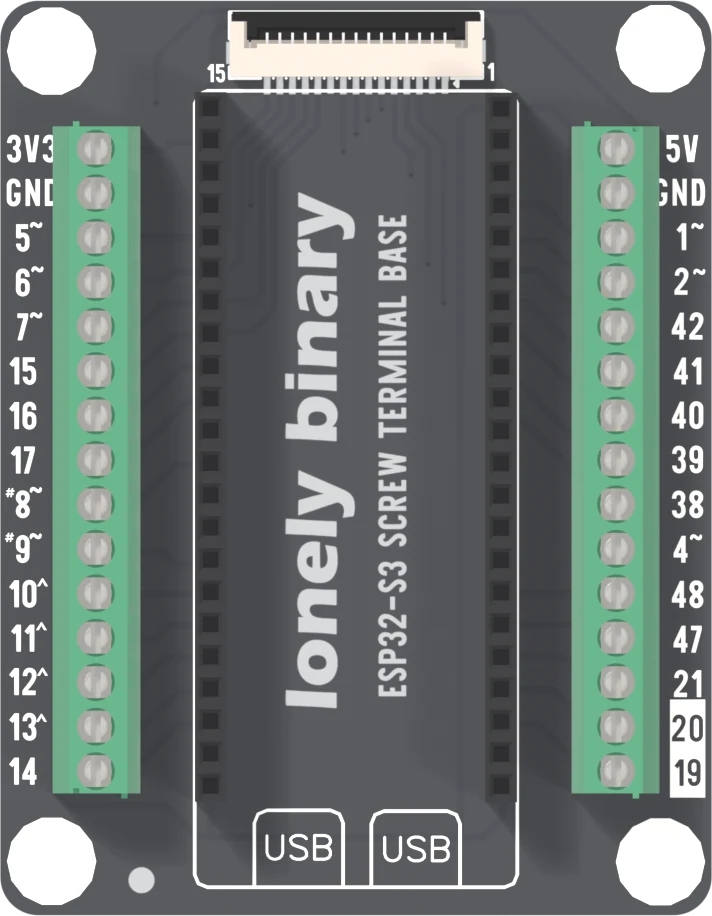
The back says the same. In the corner at the USB end it prints a warning triangle and a note that the board fits in one direction, to align it with the USB mark before plugging in, and that the wrong way can damage it for good.
Nothing stops the other way
The two sockets are 22 positions long and 22.86 mm apart, and the dev board's two rows of pins are too. Turn the board end for end and it seats as firmly as the right way round. There is no key, no notch and no lip. The only cue is which end the USB sockets are at, and a screw terminal base gives you no reason to look: there is nothing on top of the sockets to read.
What goes wrong
Turned round, the dev board's left row goes into the base's right socket and runs the other way, and the same the other way. From this base's net list:
- The dev board's two 3V3 pins land on the right socket's last two positions, U2.21 and U2.22. Those are ground, and they also hold the dev board's own ground pin. The regulator's output is wired straight to its ground.
- The dev board's GND pins land on U4.1 and U4.2, the two sockets that carry 3V3 on the base, and from there the left block's top way and the display plug's supply contact. That way is now at 0 V.
- The dev board's 5V pin lands on U2.2, the GPIO 43 socket. No terminal carries GPIO 43, so the 5V does not reach any way, but the right block's 5V way is now connected to the dev board's GPIO 43 pin instead.
A wire already screwed into the left block's top way or the right block's top way is on one of those nets. That is the reason to seat the board before wiring anything, and never to move it with a cable in.
What you will see
Nothing lights, including the red power LED on the ESP32-S3, because the 3.3 volt rail it sits on is shorted. The regulator gets warm and then hot. Your computer may complain about the USB port.
What to do
Seat the board first, then plug in the cable. With no cable in, nothing is powered, so a board in the wrong way costs nothing.
If nothing lights, the cable comes out before anything else happens. Then look at which end the USB sockets are. Turn the board round, and check every wire in the blocks before the cable goes back in.
The regulator limits its own current and shuts down when it overheats, so a few seconds the wrong way round is often survivable. It is still the one mistake on this base that can end a session.
When it does not work
Unplug the cable first, then look at the USB sockets. If they are at the display plug end and not over the two boxes printed USB, the board is in end for end and its 3.3 V output is shorted to ground. Take it out, turn it round, and try again before plugging anything else in.
Often not. The regulator on the ESP32-S3 limits its own current and shuts down when it overheats, which is what a short makes it do. Turn the board round and try it. If it now uploads and runs, carry on; if it stays dead, the regulator or the chip may be damaged.
Unplug, turn the board round, then check every wire. A wire on the left block's 3V3 way, or on its way for a sensor's supply, was at ground. A wire on the right block's 5V way was on GPIO 43, a pin made for signals. A module on either may have been given the wrong supply, so check it is not hot before you power it again.
A pin is folded under the board or missing its socket. Lift it out straight, check that all 44 pins are straight, and press down evenly at each end. A half-seated pin works one moment and not the next.
Two fifteen-way blocks, 26 GPIOs once each, and the two pins that are not where the dev board's rows put them.
The screw terminal base →Edit this page — content/books/esp32s3-base/screw-which-way-round.mdx
Questions about this product
See what other owners have asked, and read their solutions.
This page covers several products. Choose yours to see the right discussions.
Discuss this article
Ask about this page. The answer stays here, on the page it belongs to, for whoever hits the same wall next.