
What is in the box
An UNO R3, the TinkerBlock shield that sits on it, twelve modules and the cables that join them. Each of those already has a page of its own; this one says what each part is for, which socket the labs keep it in, and where to read about it.
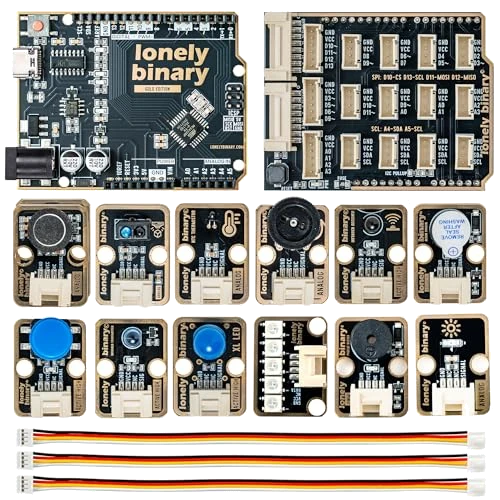
Three parts and their pages
The kit is an UNO R3, a shield and twelve modules. None of them is explained twice on this site:
| Part | What it is for | Its own pages |
|---|---|---|
| UNO R3 | The board: an ATmega328P, USB-C, the header strips | The UNO R3 handbook |
| The Arduino IDE and the language | setup(), loop(), pins, millis(), libraries | The ATmega328P book |
| TinkerBlock shield | Turns the header strips into sockets | The shield, in this book |
| Twelve modules | One part each, with its resistors fitted | One page each under TinkerBlock |
| Cables | A white plug at each end: one socket to one module |
This book holds what none of those pages can: the shield, and builds that put several modules together.
Twelve modules, twelve homes
Pick a module to see what it does, which socket the labs keep it in and the pin that socket puts it on. The shield has eight 4-pin sockets for single pins plus four for I2C, and the kit has twelve modules, so eight have a socket of their own from the start. The last chapter's four modules (the microphone, the reflective sensor and the IR pair) move into sockets an earlier lab used, and each lab's table says so.
| Module | Does | Socket | Pin |
|---|---|---|---|
| TK01 XL LED | 10 mm blue LED, lit while its pin is HIGH | D2/D3 | D3 |
| TK04 push button | HIGH while pressed; has its own pull-down | D6/D7 | D7 |
| TK07 disc potentiometer | A thumbwheel: 0 to 5 V | D9/A0 | A0 |
| TK20 ambient light sensor | Voltage rises with light | A0/A1 | A1 |
| TK12 NTC thermistor | Voltage falls as it warms | A2/A3 | A3 |
| TK33 WS2812 LED bar | Five colour LEDs on one data wire | D4/D5 | D5 |
| TK37 passive buzzer | Any note tone() plays | D8/D9 | D9 |
| TK36 active buzzer | One note while its pin is HIGH | D10/D11 | D11 |
| TK27 analog microphone | Voltage swings with sound | D9/A0 | A0 |
| TK57 reflective optical sensor | Infrared out and back: low near white | A0/A1 | A1 |
| TK64 IR receiver | Voltage rises with infrared | A2/A3 | A3 |
| TK63 IR transmitter | An infrared LED, on while its pin is HIGH | an SDA/SCL socket | SCL (A5) |
Every module's page starts with its first sketch on its own. Run that first when a module in a lab does not behave: if it works alone, the module is fine and the fault is in the lab's wiring or sketch.
Before the first lab
Install the Arduino IDE and, if the port does not appear, the CH340 driver: the ATmega328P book starts there. Upload one sketch to the bare UNO before the shield goes on, so that a later problem cannot be the board, the cable or the driver.
When it does not work
Check the code printed on each module's front against the twelve in the table: TK01, TK04, TK07, TK12, TK20, TK27, TK33, TK36, TK37, TK57, TK63 and TK64. The two buzzers look alike, so tell them apart by the code, or by the test in the next answer. Contact the shop with the codes you have.
Hold each module's SIGNAL HIGH with a one-line sketch. The active buzzer (TK36) beeps, because it has its own oscillator. The passive buzzer (TK37) stays silent, because it only sounds while its pin is a square wave, which tone() makes. Set the pin LOW again straight after: held HIGH, the passive buzzer's coil draws about 200 mA.
Only while it is plugged in. A lab uses two or three modules at a time. Move a cable from module to module as the labs change, with the USB cable unplugged.
It runs the same ATmega328P and the same sketches, and the Arduino IDE treats it as an Arduino Uno. It has a USB-C socket and a CH340C USB chip in place of the original's USB-B and ATmega16U2, so it may need the CH340 driver on an older computer.
Which socket puts a module on which pin, and what else is on the shield.
The shield: twelve sockets, one rule →Edit this page — content/books/tkbu/in-the-box.mdx
Questions about this product
See what other owners have asked, and read their solutions.
TinkerBlock UNO R3 Starter Kit, 12 Modules
Loading discussions…
Discuss this article
Ask about this page. The answer stays here, on the page it belongs to, for whoever hits the same wall next.