In, out, and the knob
An analog block plugs into the socket at the top, your board wires to the header at the bottom, and between them an LM393 comparator asks one question: is the block's voltage above or below the one the blue knob sets? The answer is HIGH or LOW. Despite the name, it is a comparator, not a converter.
A block on top, your board below
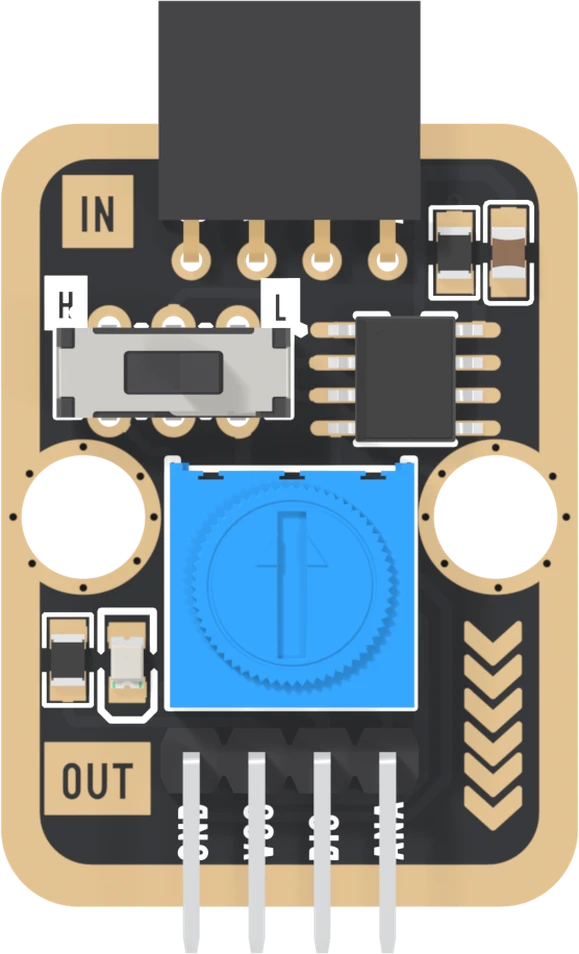
The TK29 has two four-pin connectors. The IN socket at the top takes another TinkerBlock: any block whose SIGNAL pin carries a voltage, such as the TK08 potentiometer, the TK20 light sensor or the TK27 microphone. The block pushes straight in and draws its power from the TK29.
The OUT header at the bottom goes to your board: GND, VCC, and two signals. DIG is the answer. ANA is the block's own voltage, passed through untouched.
The parts between them
The chip is an LM393, two comparators in one package, and this board uses one of them. A comparator has two inputs and one output. It looks at the two voltages and says which is bigger, and nothing else.
One input gets the block's voltage. The other gets the blue knob's, which is a 10 kΩ trimmer wired from VCC to GND: turn it and its middle leg moves anywhere from 0 V to VCC. That voltage is the threshold. The slide switch decides which input gets which, and so which way round the answer comes out.
Not a converter
The name says analog to digital, and in one sense it is right: a voltage
goes in and a digital signal comes out. But an analog-to-digital converter,
the kind behind analogRead, returns a number. This returns one bit.
That is useful when one bit is the whole question: is it dark yet, is it loud, is the knob past the mark. The decision happens in hardware, and it is set with a screwdriver rather than a line of code. What it costs is everything else: how far past the mark, and by how much. For that, read ANA too, which the first read does.
When it does not work
No. With nothing in the IN socket the comparator's input is connected to nothing, and DIG wanders with whatever is nearby. Push an analog block into IN first: a TK08 potentiometer, a TK20 light sensor or a TK27 microphone.
Not in that sense. analogRead gives you a number, 0 to 1023 on an Uno. This board gives one bit: HIGH or LOW, above or below the knob. It passes the block's voltage through on ANA as well, so your board's own ADC can still read the number.
Partly. Power it from 5 V or 3.3 V through VCC and GND and it still compares, and its red LED shows the answer, lit for LOW. To switch anything bigger than that LED you need something to act on DIG, such as your board or a transistor.
Eight holes, and three of them are the same wire as another.
Which pin is which →Edit this page — content/books/analog-to-digital-signal/in-out-and-the-knob.mdx
Questions about this product
See what other owners have asked, and read their solutions.
Analog to Digital Signal
Loading discussions…
Discuss this article
Ask about this page. The answer stays here, on the page it belongs to, for whoever hits the same wall next.