Specifications
| Type | 1.8 inch TFT LCD, ST7735 controller |
|---|---|
| Resolution | 160 x 128, 18-bit colour |
| Interface | SPI, plus DC and RESET |
| Supply voltage | 3.3 V logic; 5 V tolerant on some boards |
| Backlight | Always on, or PWM-controlled by pin |
What it is
An ST7735 panel on SPI. Send it a window and then a stream of pixels; it holds the image.
The thing that shapes how you write code for it is that a full-screen redraw is 20,480 pixels, and at typical SPI speeds that is tens of milliseconds. Clearing and redrawing everything each frame gives you visible flicker and a sluggish loop. The fix is to redraw only what changed — erase the old number by drawing it in the background colour, then draw the new one — and that habit is worth forming here because it applies to every display afterwards.
Adafruit's ST7735 library sits on top of Adafruit_GFX, so text, shapes and
fonts all come from the same API you would use for an OLED.
It is a 3.3 V part. Boards vary in whether they include level shifting; if yours does not, a 5 V Arduino needs resistors or TK97 on the SPI lines.
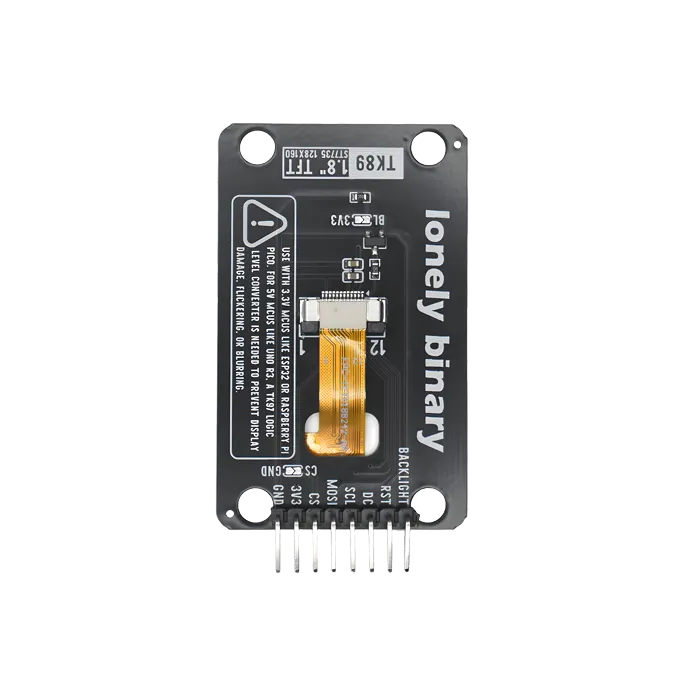
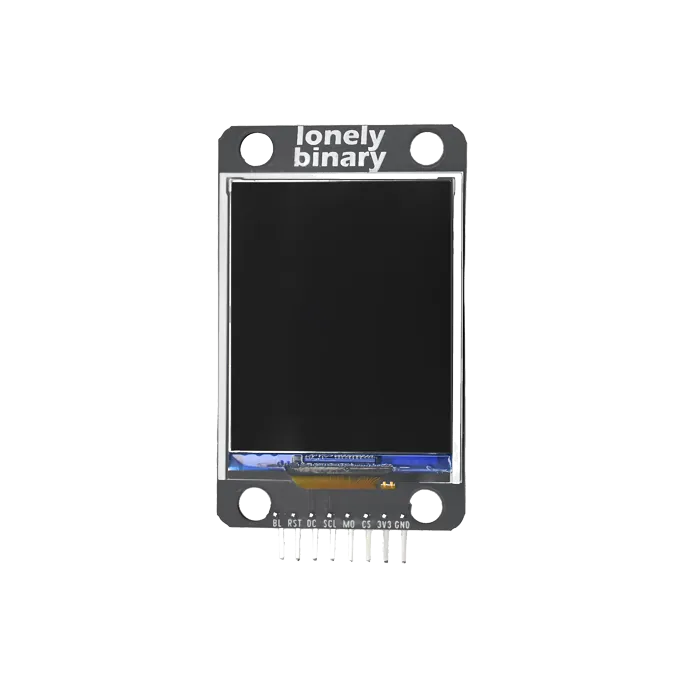
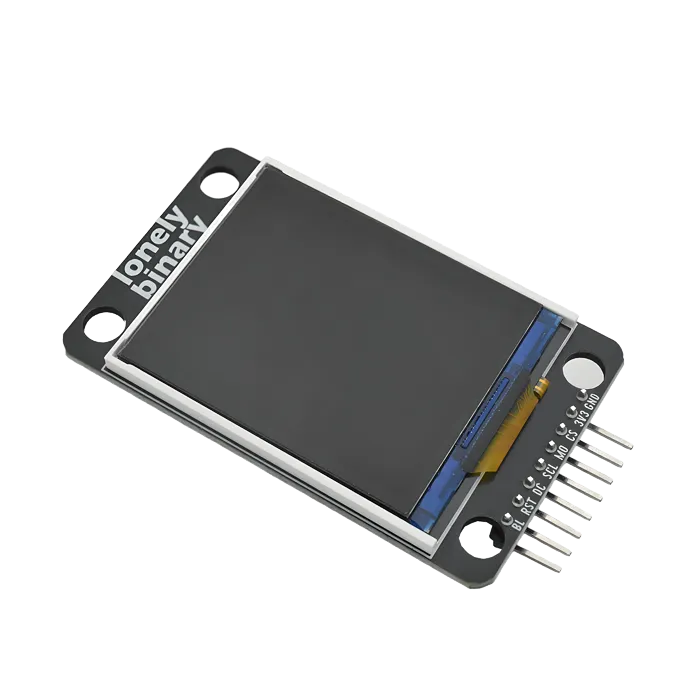
Pinout
- GND (negative): Like the negative terminal (-) of a battery, connect to the control board's GND
- 3V3 (positive): Like the positive terminal (+) of a battery, connect to the control board's 3.3V (this module requires 3.3V power supply)
- CS (chip select): SPI chip select signal, connect to the control board's digital pin (e.g. Arduino D10 or Pico GPIO 5)
- MOSI (master out slave in): SPI data output pin, connect to the control board's SPI data pin (e.g. Arduino D11 or Pico GPIO 19)
- SCL (clock): SPI clock signal, connect to the control board's SPI clock pin (e.g. Arduino D13 or Pico GPIO 18)
- DC (data/command): Data/command selection pin, connect to the control board's digital pin (e.g. Arduino D9 or Pico GPIO 4)
- RST (reset): Reset pin, connect to the control board's digital pin (e.g. Arduino D8 or Pico GPIO 3)
- BL (backlight): Backlight control pin, connect to the control board's digital pin (e.g. Arduino D7 or Pico GPIO 2)
Wiring
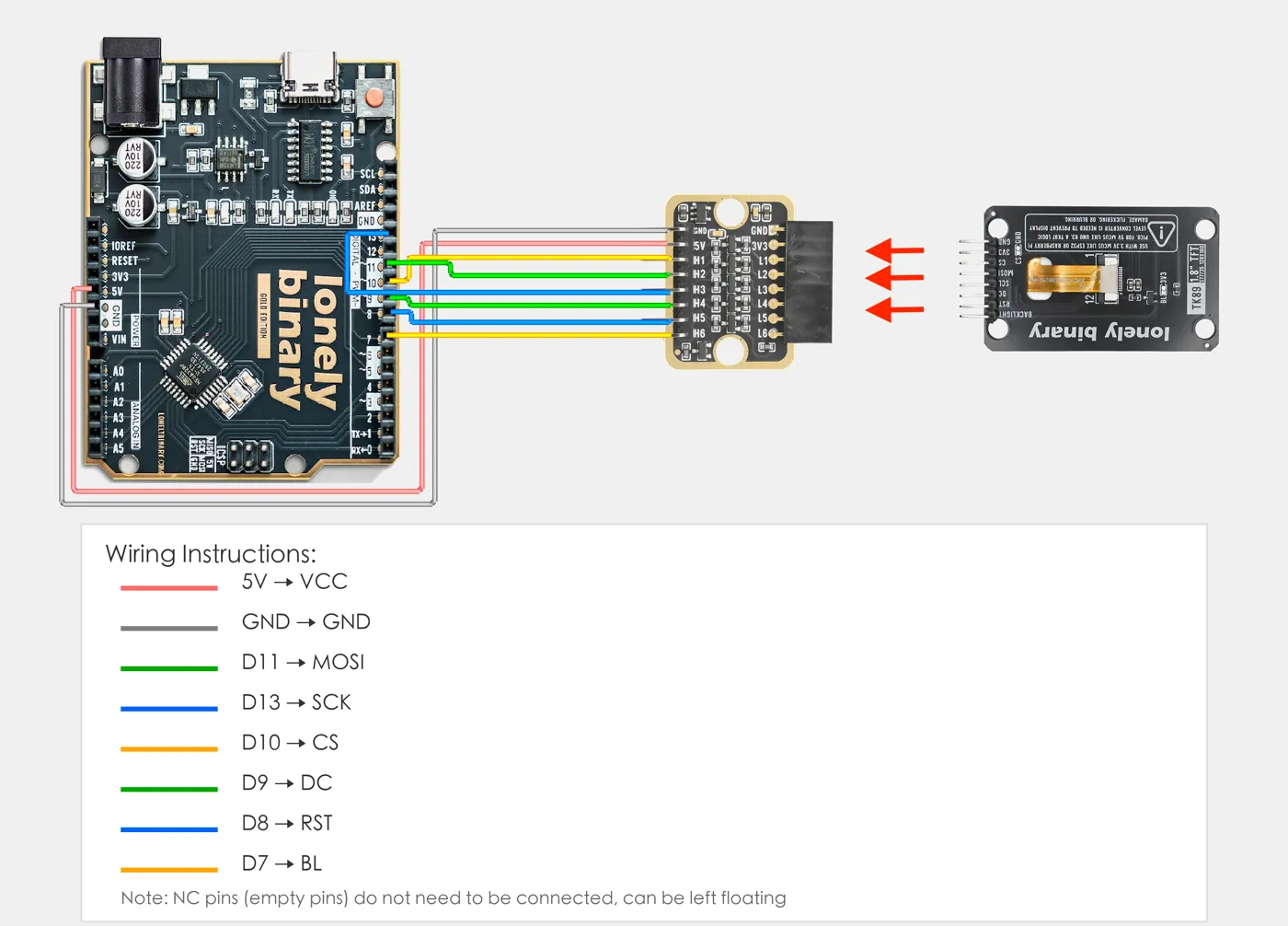
For Arduino Uno R3 (5V MCU): ⚠️ Must use TK97 logic level converter module!
- Arduino Uno (5V) → TK97 logic level converter module → TFT screen (3.3V)
- Note: TFT screen display direction and "LOGIC LEVEL CONVERTER" text on TK97 module should be in the same direction
- Please refer to TK97 module documentation for correct connection
Example
#include <Adafruit_GFX.h>
#include <Adafruit_ST7735.h>
#include <SPI.h>

// Pin number: change these to match your wiring
#define TFT_CS   10  // CS pin (chip select)
#define TFT_DC   9   // DC pin (data/command selection)
#define TFT_RST  8   // RST pin (reset)
#define TFT_BL   7   // BL pin (backlight control)

// Create TFT display object (using hardware SPI)
Adafruit_ST7735 tft = Adafruit_ST7735(TFT_CS, TFT_DC, TFT_RST);

// ==================== Test Functions ====================

// Test: Fill screen
void testFillScreen() {
  Serial.println("Test: Fill screen");
  tft.fillScreen(ST77XX_BLACK);
  delay(500);
  tft.fillScreen(ST77XX_RED);
  delay(500);
  tft.fillScreen(ST77XX_GREEN);
  delay(500);
  tft.fillScreen(ST77XX_BLUE);
  delay(500);
  tft.fillScreen(ST77XX_WHITE);
  delay(500);
}

// Test: Text display
void testText() {
  Serial.println("Test: Text display");
  tft.fillScreen(ST77XX_BLACK);
  tft.setCursor(0, 0);
  tft.setTextColor(ST77XX_WHITE);
  tft.setTextSize(2);
  tft.println("SPI LCD Test");

  tft.setTextColor(ST77XX_RED);
  tft.setTextSize(1);
  tft.println("RESOLUTION:128x160");
  tft.println("DRIVER IC:ST7735");
  tft.println("Interface: SPI");
  tft.println("Support rotation");

  delay(2000);
}

// Test: Color display
void testColors() {
  Serial.println("Test: Color display");
  tft.fillScreen(ST77XX_BLACK);

  uint16_t colors[] = {
    ST77XX_RED, ST77XX_GREEN, ST77XX_BLUE,
    ST77XX_YELLOW, ST77XX_MAGENTA, ST77XX_CYAN, ST77XX_WHITE
  };

  int w = tft.width() / 4;
  int h = tft.height() / 2;

  for (int i = 0; i < 4; i++) {
    for (int j = 0; j < 2; j++) {
      int idx = i + j * 4;
      if (idx < 7) {
        tft.fillRect(i * w, j * h, w, h, colors[idx]);
      }
    }
  }

  delay(2000);
}

// Test: Line drawing
void testLines() {
  Serial.println("Test: Line drawing");
  tft.fillScreen(ST77XX_BLACK);

  for (int i = 0; i < tft.width(); i += 10) {
    tft.drawLine(0, 0, i, tft.height() - 1, ST77XX_RED);
    delay(10);
  }
  for (int i = 0; i < tft.height(); i += 10) {
    tft.drawLine(0, 0, tft.width() - 1, i, ST77XX_GREEN);
    delay(10);
  }

  delay(1000);
}

// Test: Circle drawing
void testCircles() {
  Serial.println("Test: Circle drawing");
  tft.fillScreen(ST77XX_BLACK);

  int centerX = tft.width() / 2;
  int centerY = tft.height() / 2;

  int maxR = (centerX < centerY) ? centerX : centerY;
  for (int r = 5; r < maxR; r += 5) {
    tft.drawCircle(centerX, centerY, r, ST77XX_BLUE);
    delay(50);
  }

  delay(1000);
}

// Test: Rectangle drawing
void testRectangles() {
  Serial.println("Test: Rectangle drawing");
  tft.fillScreen(ST77XX_BLACK);

  int maxSize = (tft.width() < tft.height()) ? tft.width() : tft.height();
  for (int i = 0; i < maxSize / 2; i += 5) {
    tft.drawRect(i, i, tft.width() - 2 * i, tft.height() - 2 * i, ST77XX_YELLOW);
    delay(50);
  }

  delay(1000);
}

// Test: Screen rotation
void testRotation() {
  Serial.println("Test: Screen rotation");

  for (uint8_t rotation = 0; rotation < 4; rotation++) {
    tft.setRotation(rotation);
    tft.fillScreen(ST77XX_BLACK);
    tft.setCursor(10, 10);
    tft.setTextColor(ST77XX_WHITE);
    tft.setTextSize(2);
    tft.print("Rotation ");
    tft.println(rotation);
    delay(2000);
  }

  // Restore default direction
  tft.setRotation(0);
}

// Test: Gradient effect
void testGradient() {
  Serial.println("Test: Gradient effect");
  tft.fillScreen(ST77XX_BLACK);

  for (int y = 0; y < tft.height(); y++) {
    uint16_t color = tft.color565(0, (y * 255) / tft.height(), 255 - (y * 255) / tft.height());
    tft.drawFastHLine(0, y, tft.width(), color);
  }

  delay(2000);
}

// Display information page
void displayInfo() {
  tft.fillScreen(ST77XX_BLACK);
  tft.setCursor(0, 0);
  tft.setTextColor(ST77XX_WHITE);
  tft.setTextSize(1);

  tft.println("SPI LCD Test Program");
  tft.println("================");
  tft.print("Width: ");
  tft.println(tft.width());
  tft.print("Height: ");
  tft.println(tft.height());
  tft.println("");
  tft.println("Tests:");
  tft.println("1. Fill Screen");
  tft.println("2. Text Display");
  tft.println("3. Colors");
  tft.println("4. Lines");
  tft.println("5. Circles");
  tft.println("6. Rectangles");
  tft.println("7. Rotation");
  tft.println("8. Gradient");

  delay(3000);
}

// ==================== Initialization ====================
void setup() {
  // Initialize serial communication
  Serial.begin(115200);
  delay(1000);

  Serial.println("========================================");
  Serial.println("TK89-1.8INCH TFT ST7735 Test Program");
  Serial.println("Driver IC: ST7735/ST7735S");
  Serial.println("Resolution: 128x160");
  Serial.println("Using Adafruit ST7735 Library");
  Serial.println("========================================");

  // Initialize backlight
  pinMode(TFT_BL, OUTPUT);
  digitalWrite(TFT_BL, HIGH);  // Turn on backlight

  // Initialize LCD
  Serial.println("Initializing LCD...");

  // Reset screen first
  pinMode(TFT_RST, OUTPUT);
  digitalWrite(TFT_RST, LOW);
  delay(10);
  digitalWrite(TFT_RST, HIGH);
  delay(120);

  // ST7735 initialization (128x160)
  Serial.println("Initializing ST7735 screen (128x160)...");
  tft.initR(INITR_BLACKTAB);  // If screen is white, try INITR_GREENTAB or INITR_REDTAB
  tft.setRotation(0);  // Set rotation direction: 0=normal, 1=90°, 2=180°, 3=270°

  // Set column and row offset (if library supports, fixes display position offset)
  // This setting is important if screen is white or not displaying!
  #if defined(ADAFRUIT_ST77XX_H)
    tft.setColRowStart(0, 0);  // If display position is wrong, try (2, 0), (0, 1), (2, 1), etc.
  #endif

  // If screen is white, try the following methods:
  // 1. Try different initialization parameters: INITR_BLACKTAB, INITR_GREENTAB, INITR_REDTAB
  // 2. Try different offsets: setColRowStart(2, 0), setColRowStart(0, 1), etc.

  // Test: Fill a color first to see if there's a response
  tft.fillScreen(ST77XX_RED);
  delay(500);
  tft.fillScreen(ST77XX_BLACK);

  Serial.println("LCD initialization complete");

  // Display information
  displayInfo();

  Serial.println("Starting tests...");
}

// ==================== Main Loop ====================
void loop() {
  // Run various tests
  testFillScreen();
  testText();
  testColors();
  testLines();
  testCircles();
  testRectangles();
  testRotation();
  testGradient();

  // Finally display information
  displayInfo();

  Serial.println("Test cycle complete, restarting...");
  delay(2000);
}from machine import Pin, SPI
import time
# Import ST7735 library
try:
from st7735 import TFT, TFTColor
except ImportError:
print("=" * 60)
print("Error: st7735.py library file not found")
print("=" * 60)
print("Installation method:")
print("1. Open st7735.py file in this folder in Thonny")
print("2. File → Save As → Select 'MicroPython Device' → Save to Pico")
print("3. Ensure st7735.py file is saved in Pico root directory or same directory as main program")
print("=" * 60)
raise ImportError("Please save st7735.py file to Pico first")
# ==================== Pin Definition ====================
TFT_CS = 5 # CS pin (chip select)
TFT_DC = 4 # DC pin (data/command selection)
TFT_RST = 3 # RST pin (reset)
TFT_BL = 2 # BL pin (backlight control)
SPI_MOSI = 19 # MOSI pin (SPI data)
SPI_SCK = 18 # SCK pin (SPI clock)
# ==================== Initialization ====================
# Initialize backlight
bl = Pin(TFT_BL, Pin.OUT)
bl.value(1) # Turn on backlight
# Initialize SPI
# Pico SPI pin mapping:
# SPI0: SCK=GPIO18, MOSI=GPIO19, MISO=GPIO16
# SPI1: SCK=GPIO10, MOSI=GPIO11, MISO=GPIO12
spi = None
if SPI_SCK == 18 and SPI_MOSI == 19:
# GPIO18 and GPIO19 correspond to SPI0
spi = SPI(0, baudrate=10000000, polarity=0, phase=0, sck=Pin(SPI_SCK), mosi=Pin(SPI_MOSI))
elif SPI_SCK == 10 and SPI_MOSI == 11:
# GPIO10 and GPIO11 correspond to SPI1
spi = SPI(1, baudrate=10000000, polarity=0, phase=0, sck=Pin(SPI_SCK), mosi=Pin(SPI_MOSI))
else:
# Other pin combinations, try SPI0 first, then SPI1 if fails
try:
spi = SPI(0, baudrate=10000000, polarity=0, phase=0, sck=Pin(SPI_SCK), mosi=Pin(SPI_MOSI))
except:
spi = SPI(1, baudrate=10000000, polarity=0, phase=0, sck=Pin(SPI_SCK), mosi=Pin(SPI_MOSI))
if spi is None:
raise RuntimeError("SPI initialization failed")
# Create TFT display object
# TFT(spi, DC pin, RST pin, CS pin)
tft = TFT(spi, TFT_DC, TFT_RST, TFT_CS)
# ==================== Test Functions ====================
def test_fill_screen():
"""Test: Fill screen"""
tft.fill(TFT.BLACK)
time.sleep_ms(500)
tft.fill(TFT.RED)
time.sleep_ms(500)
tft.fill(TFT.GREEN)
time.sleep_ms(500)
tft.fill(TFT.BLUE)
time.sleep_ms(500)
tft.fill(TFT.WHITE)
time.sleep_ms(500)
def test_text():
"""Test: Text display (using rectangles instead, as text requires fonts)"""
tft.fill(TFT.BLACK)
tft.fillrect((0, 0), (128, 20), TFT.WHITE)
tft.fillrect((0, 25), (128, 20), TFT.RED)
tft.fillrect((0, 50), (128, 20), TFT.GREEN)
tft.fillrect((0, 75), (128, 20), TFT.BLUE)
time.sleep(2)
def test_colors():
"""Test: Color display"""
tft.fill(TFT.BLACK)
colors = [TFT.RED, TFT.GREEN, TFT.BLUE, TFT.YELLOW, TFT.PURPLE, TFT.CYAN, TFT.WHITE]
w = 128 // 4
h = 160 // 2
for i in range(4):
for j in range(2):
idx = i + j * 4
if idx < 7:
tft.fillrect((i * w, j * h), (w, h), colors[idx])
time.sleep(2)
def test_lines():
"""Test: Line drawing"""
tft.fill(TFT.BLACK)
for i in range(0, 128, 10):
tft.line((0, 0), (i, 159), TFT.RED)
time.sleep_ms(10)
for i in range(0, 160, 10):
tft.line((0, 0), (127, i), TFT.GREEN)
time.sleep_ms(10)
time.sleep(1)
def test_circles():
"""Test: Circle drawing"""
tft.fill(TFT.BLACK)
center_x, center_y = 64, 80
max_r = min(center_x, center_y)
for r in range(5, max_r, 5):
tft.circle((center_x, center_y), r, TFT.BLUE)
time.sleep_ms(50)
time.sleep(1)
def test_rectangles():
"""Test: Rectangle drawing"""
tft.fill(TFT.BLACK)
max_size = min(128, 160)
for i in range(0, max_size // 2, 5):
tft.rect((i, i), (128 - 2 * i, 160 - 2 * i), TFT.YELLOW)
time.sleep_ms(50)
time.sleep(1)
def test_rotation():
"""Test: Screen rotation"""
for rotation in range(4):
tft.rotation(rotation)
tft.fill(TFT.BLACK)
tft.fillrect((10, 10), (50, 30), TFT.WHITE)
time.sleep(2)
tft.rotation(0) # Restore default direction
def display_info():
"""Display information page"""
tft.fill(TFT.BLACK)
tft.fillrect((0, 0), (128, 15), TFT.WHITE)
tft.fillrect((0, 20), (64, 10), TFT.RED)
tft.fillrect((64, 20), (64, 10), TFT.GREEN)
tft.fillrect((0, 35), (64, 10), TFT.BLUE)
tft.fillrect((64, 35), (64, 10), TFT.YELLOW)
tft.fillrect((0, 50), (64, 10), TFT.PURPLE)
tft.fillrect((64, 50), (64, 10), TFT.CYAN)
time.sleep(3)
# ==================== Main Program ====================
print("=" * 50)
print("TK89-1.8INCH TFT ST7735 Test Program")
print("Resolution: 128x160")
print("=" * 50)
# Initialize screen
# Try different initialization methods to find the version suitable for your screen
init_methods = [
("initr()", "Red tab version", lambda: tft.initr()),
("initb()", "Blue tab version", lambda: tft.initb()),
("initb2()", "Another blue tab version", lambda: tft.initb2()),
("initg()", "Green tab version", lambda: tft.initg()),
]
init_success = False
for method_name, description, method_func in init_methods:
try:
method_func()
tft.rotation(0) # Set rotation direction: 0=normal, 1=90°, 2=180°, 3=270°
# Quick test: Fill colors
tft.fill(TFT.RED)
time.sleep_ms(200)
tft.fill(TFT.GREEN)
time.sleep_ms(200)
tft.fill(TFT.BLUE)
time.sleep_ms(200)
tft.fill(TFT.BLACK)
print(f"✓ {method_name} ({description}) initialization successful")
init_success = True
break
except Exception as e:
print(f"✗ {method_name} failed: {e}")
continue
if not init_success:
print("=" * 50)
print("Warning: All initialization methods failed!")
print("Please check wiring, power supply, and SPI configuration")
print("=" * 50)
raise RuntimeError("Screen initialization failed")
print("Screen initialization complete, starting tests...")
print()
# Display information page
display_info()
# Main loop
try:
while True:
print("Test: Fill screen")
test_fill_screen()
print("Test: Text display")
test_text()
print("Test: Color display")
test_colors()
print("Test: Line drawing")
test_lines()
print("Test: Circle drawing")
test_circles()
print("Test: Rectangle drawing")
test_rectangles()
print("Test: Screen rotation")
test_rotation()
print("Display information page")
display_info()
print("Test cycle complete, restarting...")
print()
time.sleep(2)
except KeyboardInterrupt:
print("\nProgram interrupted by user")
except Exception as e:
print("=" * 50)
print("Program error occurred!")
print(f"Error: {e}")
print("=" * 50)
import sys
sys.print_exception(e)When it doesn’t work
- The screen is white, or shows noise.
- Almost always RESET or DC. Both are required and neither is optional; check them before suspecting SPI.
- Colours are inverted or the image is mirrored.
- Panel variants differ. The library has initialisation options — `INITR_BLACKTAB`, `GREENTAB`, `REDTAB` — and one of them is right for your board.
- Updates flicker.
- You are clearing the whole screen every frame. Redraw only the region that changed.