Two forms of the adapter
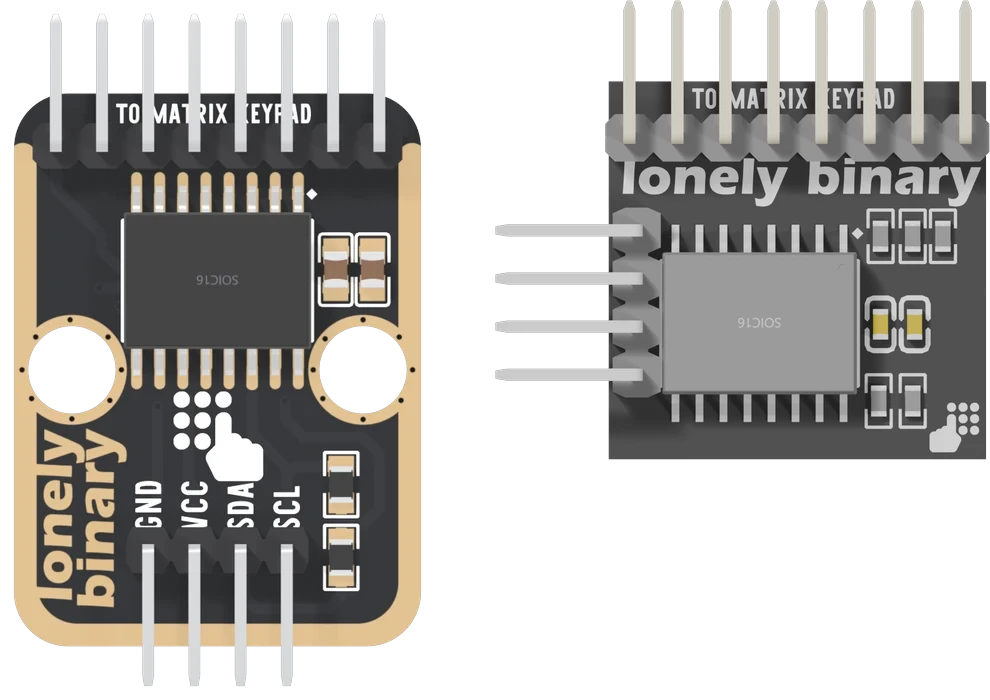
The adapter exists in two forms: the TinkerBlock TK85 (v2) in the kit, and the compact adapter (v3) in the keypad packs. Same chip, same keypad header, same library and keymaps. The board, the edge the wires leave by and the address are what differ.
Same circuit
Both forms are the same few parts. An NXP PCF8574 port expander, its eight port pins wired straight to an eight-pin keypad header, a four-pin header for your board, two 10 kΩ pull-ups on SDA and SCL behind a cut pad, and a 10 µF and a 100 nF capacitor across the supply. The keypad header runs P7 to P0 left to right on both, so a keypad and its keymap work on either.
Three differences
The board. The TK85 is a TinkerBlock block, 22.4 × 30.4 mm, with a gold edge and two holes 16 mm apart that push onto the LEGO base plate. The compact adapter is a 20 mm square with nothing to mount it by: it is meant to sit behind a keypad in a box.
Where the wires go. The TK85's four pins leave the bottom edge, opposite the keypad, and read GND, VCC, SDA, SCL left to right on the front. The compact adapter's leave its side, and the names are printed on its back.
The address. This is the difference that reaches a sketch. The TK85 wires the chip's three address pins straight to ground, so it answers at 0x20 and nothing on the board changes it. The compact adapter holds the same pins low through resistors and gives each one a solder pad on the back, so it ships at 0x20 and can be moved to any address from 0x20 to 0x27.
So one TK85 per I²C bus, and up to eight compact adapters. More than one keypad covers both cases.
Which is which, in this book
Wherever the book says TK85, it means the v2 board from the kit, and its 3D model, pin tables and quick reference are that board. The compact adapter is the one in the soft and heavy-duty packs. Everything else — the keypads, the two reads, the keymaps, the builds — is the same on both.
When it does not work
Look for the gold edge and the two round holes. The TK85 has both, prints TK85 | MATRIX KEYPAD I2C ADAPTER on its back and has no pads marked A0 to A2. The compact adapter is a plain 20 mm square with three address pads on its back.
Nowhere on the TK85: v2 is the name the maker uses for it, and for its 3D model. No version shows in the compact adapter's photos either. The shape tells them apart.
Yes, as long as the address matches. Both ship at 0x20 with the keypad on the same eight chip pins, so the same library, the same keymap and the same four wires work on either.
Not in any practical way. Its three address pins are joined to ground by traces under the chip. Put a second keypad on a second I2C bus, or use a compact adapter, whose pads give it eight addresses.
Every pin and pad on the TK85, then what the compact adapter adds: three address pads, two of them labelled the wrong way round.
The adapter, pin by pin →Edit this page — content/books/matrix-keypad/two-forms-of-the-adapter.mdx
Questions about this product
See what other owners have asked, and read their solutions.
This page covers several products. Choose yours to see the right discussions.
Discuss this article
Ask about this page. The answer stays here, on the page it belongs to, for whoever hits the same wall next.