The four pins
Four pins, all four wired. GND is the square pad, VCC goes to your board's logic supply, and SDA and SCL are the two wires of an I2C bus. There is no light on this board: the only sign it is alive is the chip answering at 0x48.
What it is
A temperature sensor that does its own measuring. The chip on the TK42, an LM75B, holds the sensor, the converter and the I2C interface, and keeps its latest reading in a register. Your board asks for two bytes and gets degrees, with no resistor divider, no analog pin and no formula.
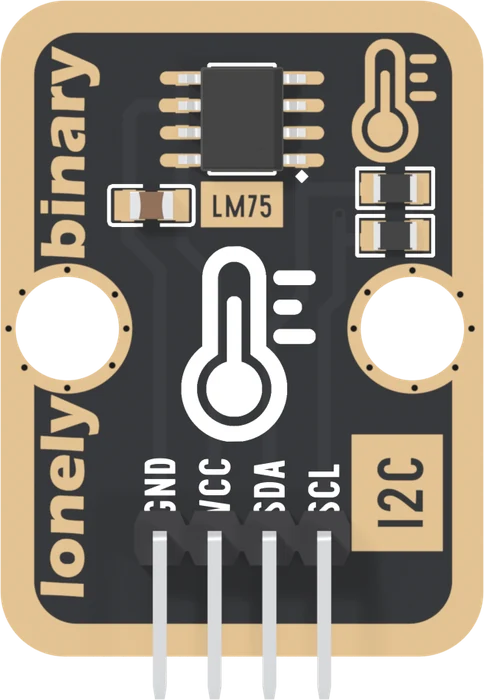
The header is right-angled, so the pins point out past the bottom edge and the board lies flat in a breadboard or on a cable.
The four names
GND is on the square pad. Count from it.
VCC powers the chip, and it is also where the two pull-up resistors end. So VCC decides the voltage on SDA and SCL. Wire it to the voltage your board's pins run at: 5V on an Uno, 3V3 on an ESP32, an ESP32-S3 or a Pico. VCC sets the bus is the reason.
SDA is serial data and SCL is serial clock: the two wires of an I2C bus. Your board drives the clock; data goes both ways on SDA. On this board SDA comes before SCL, the third pin and then the fourth.
Every pin is wired. There is no NC on this block.
The back
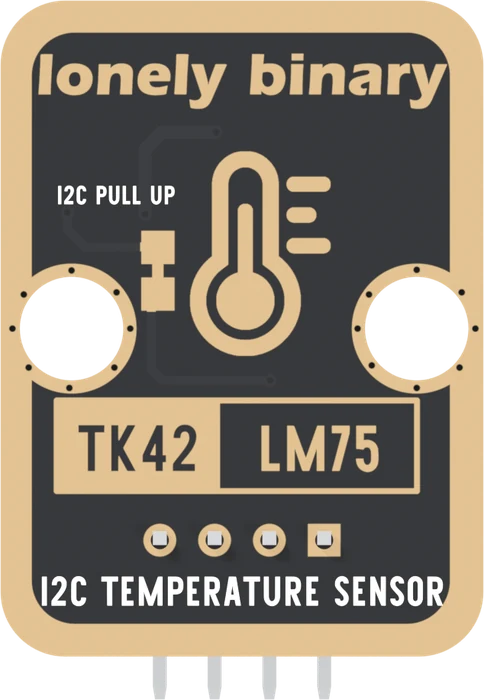
The back prints no pin names. The square pad has moved to the right, because the board is mirrored, and it is still GND. The two pads marked I2C PULL UP are the jumper that connects the pull-ups; it ships joined.
When it does not work
Hold the board with the parts facing you and the header pins pointing down. Read GND, VCC, SDA, SCL from left to right. GND is also the square pad, which is the one mark that survives when the labels are hidden in a breadboard.
Nothing is meant to. The TK42 has no power LED. Run the first-reading sketch or an I2C scan: if the chip answers at 0x48, the board is powered and wired, whatever it looks like.
Nothing is damaged. The chip never sees a valid start, and nothing answers at 0x48. Swap the two wires back. On this board SDA is the third pin and SCL the fourth, counting from the square pad.
On an Uno, no: I2C is A4 and A5 and nowhere else. An ESP32, an ESP32-S3 or a Pico can move I2C to other pins, but this book uses each board's default pins so that Wire.begin() needs no arguments.
The chip, its fixed address, the pin it leaves unconnected, and the jumper on the back.
What is on the board →Edit this page — content/books/lm75/the-four-pins.mdx
Questions about this product
See what other owners have asked, and read their solutions.
LM75 Temperature Sensor
Loading discussions…
Discuss this article
Ask about this page. The answer stays here, on the page it belongs to, for whoever hits the same wall next.