Two boards and a remote
Three receivers, three senders, three remotes. The two boards have the same outline and the same four labels, and SIGNAL does opposite things on each: an output on the TK15, an input on the TK16.
What is in the box
Three TK15 IR Receiver boards, three TK16 IR Remote Sender boards and three remotes with seventeen buttons each. The remotes take two AAA cells each, which are not included. There are no jumper wires in the box.
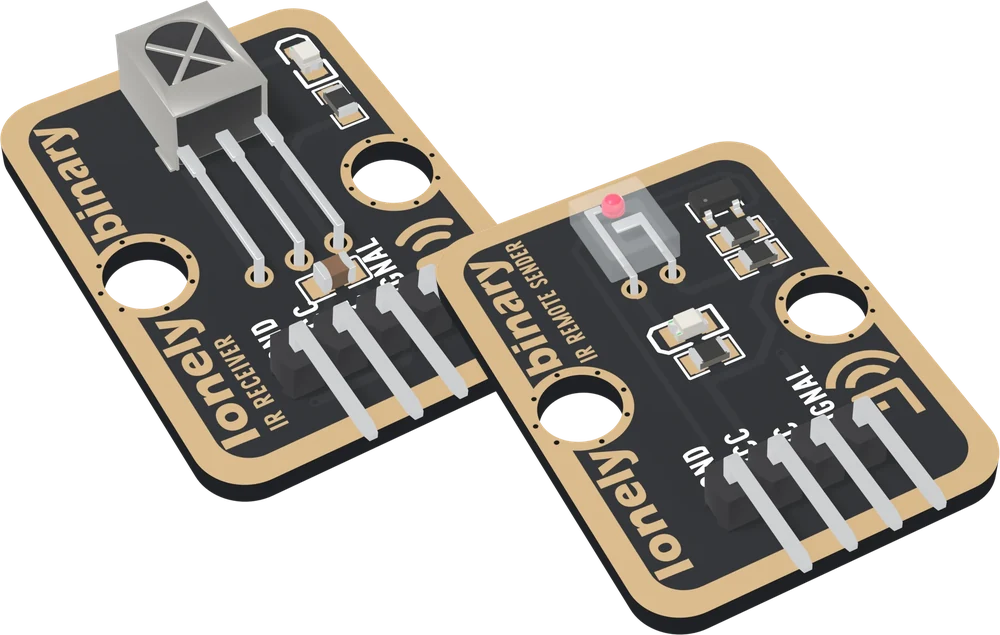
Both boards are 22.4 × 30.4 mm with a right-angle header labelled GND, VCC, NC, SIGNAL, left to right with the parts facing you. GND is the square pad. They fit the same breadboard and the same cable, and they are not interchangeable in a circuit.
Which one does what
The receiver has one chip that already contains the hard half of infrared: it hears the carrier and hands your board a plain digital signal. The sender has two LEDs, a transistor and three resistors, and generates nothing by itself. Every pulse of its carrier comes from your microcontroller.
The remote
Seventeen buttons, speaking NEC, the most common protocol on cheap remotes. It is in the box so you have something to receive before you have anything to send, and a known-good transmitter to test a receiver against.
The numbers its buttons send are this remote's own, not a standard. The remote in the next drawer uses different ones for the same key, which is the subject of codes belong to remotes.
What else you need
A microcontroller board, three jumper wires per block, and the IRremote
library by shirriff, z3t0 and ArminJo from the Arduino IDE's Library Manager.
MicroPython uses Peter Hinch's micropython_ir instead. Every sketch in this
book is an Arduino sketch for an Uno, an ESP32, an ESP32-S3 or a Pico, with a
MicroPython twin for the three that run it.
Start with the receiver. Your first key code prints what every button on the remote sends.
When it does not work
The receiver has a steel box with an X-shaped window near the top; the sender has a small clear block with a lens in it. The back says it outright: TK15 IR RECEIVER or TK16 IR REMOTE SENDER.
Batteries are not included; it takes two AAA cells. With them in, point a phone camera at the remote's front and press a button: most phone cameras show infrared as a faint flicker, which proves the remote before any board is involved.
No. One of each builds the link. The spares are for a receiver left in one project for good, and for testing a doubtful board against one you know works.
Yes, once you have read the television remote's codes with the receiver. Nothing in the kit knows your television's codes and nothing can guess them, which is why this book receives first and sends second.
Four pins, one chip, and a pull-up resistor nobody can see.
The receiver, pin by pin →Edit this page — content/books/ir-receiver/two-boards-and-a-remote.mdx
Questions about this product
See what other owners have asked, and read their solutions.
This page covers several products. Choose yours to see the right discussions.
Discuss this article
Ask about this page. The answer stays here, on the page it belongs to, for whoever hits the same wall next.