The first reading
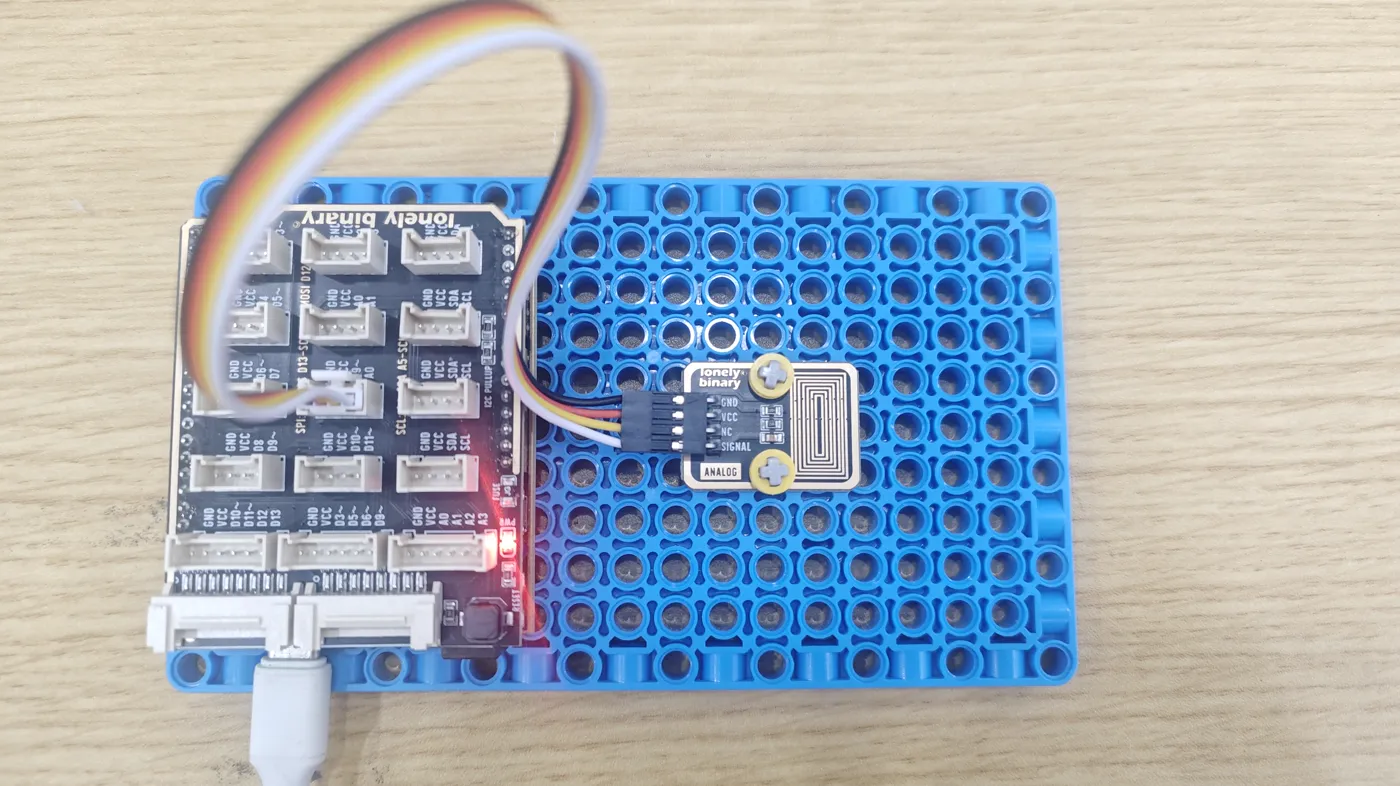
Three wires, no library, and a sketch that prints the reading four times a second. VCC goes to your board's logic voltage, SIGNAL to an analog pin: A0 on an Uno, GPIO 34 on an ESP32, GPIO 4 on an ESP32-S3, GP26 on a Pico. Dry, it prints 0 or close to it. Breathe on the loops and it jumps, then falls back as the fog clears.
Three wires
GND to GND. VCC to your board's logic voltage: 5V on an Uno, 3V3 on the three 3.3 V boards. SIGNAL to an analog pin. NC stays unconnected.
The analog pin is the same as in the Ambient Light and NTC books: A0 on an Uno, GPIO 34 on an ESP32, GPIO 4 on an ESP32-S3, GP26 on a Pico. The two ESP32 pins are on ADC1, the converter that keeps working when Wi-Fi is on.
The sketch
One call does the work. analogRead(STEAM_PIN) measures the voltage on
the pin and returns it as a count, and the sketch prints it every 250 ms.
There is no pinMode: an analog pin needs none to be read, and the board's
1 MΩ holds SIGNAL at 0 V on its own.
What you should see
Dry, the serial monitor at 115200 prints 0, or a count or two. Breathe on the loops from a few centimetres: the reading jumps as they fog, holds for a moment, then falls back over a few seconds as the fog evaporates. A wet fingertip laid across the loops sends it most of the way up and keeps it there.
Nobody has measured this block on a bench, so no numbers are promised here. How high a breath takes it depends on the breath, the room and how clean the loops are. The shape does not change: 0 dry, up when water lands, down as it dries.
The code
No library. analogRead returns SIGNAL as a count: 0 to 1023 on an Uno and a Pico, 0 to 4095 on an ESP32 or ESP32-S3. Change STEAM_PIN to the analog pin you wired SIGNAL to.
/*
  Steam Sensor - first reading                          TK65 / /p/tk65

  Wiring. Count from the square pad on the TinkerBlock board, parts
  up, header at the bottom:

    GND    -> GND
    VCC    -> 3V3 on an ESP32, ESP32-S3 or Pico; 5V on an Uno.
              Your board's logic voltage: a wet board can put
              VCC itself on the pin.
    NC     -> nothing   (unconnected on the board)
    SIGNAL -> A0 on an Uno, GPIO 34 on an ESP32,
              GPIO 4 on an ESP32-S3, GP26 on a Raspberry Pi Pico

  Arduino IDE
    Tools > Board                 your board, e.g. ESP32S3 Dev Module
    Tools > Port                  the one that appears when you plug in
    Tools > USB CDC On Boot       Enabled   (ESP32-S3 only)
    No library needed.
*/

// The analog pin SIGNAL is wired to.
// Uno: A0. ESP32: 34. ESP32-S3: 4. Pico: 26.
const int STEAM_PIN = 4;

void setup() {
  Serial.begin(115200);
  // No pinMode: an analog pin needs none to be read.
}

void loop() {
  // 0 on a dry board. Water across the loops raises it:
  // up to 1023 on an Uno or a Pico, 4095 on an ESP32 or S3.
  int reading = analogRead(STEAM_PIN);

  Serial.print("reading ");
  Serial.println(reading);

  delay(250);
}
There is no pinMode: an analog pin needs none to be read, and the board holds SIGNAL at 0 V itself. The count is not a unit of anything; it grows with how much water is on the loops and how conductive it is. The sketch compiles for an ESP32-S3 and an Uno.
View on GitHub · blocks/tk65-steam-sensor/arduino/steam_first_reading/steam_first_reading.ino @ v1.5The same reading in MicroPython, for an ESP32, an ESP32-S3 or a Pico. read_u16 returns SIGNAL as a count from 0 to 65535 on all three.
"""
  Steam Sensor - first reading, MicroPython             TK65 / /p/tk65

  Wiring. Count from the square pad on the TinkerBlock board, parts
  up, header at the bottom:

    GND    -> GND
    VCC    -> 3V3   (never 5V: a wet board puts VCC on the pin)
    NC     -> nothing   (unconnected on the board)
    SIGNAL -> GPIO 34 on an ESP32, GPIO 4 on an ESP32-S3,
              GP26 on a Raspberry Pi Pico

  Thonny
    Run > Configure interpreter   MicroPython (ESP32) or
                                  MicroPython (Raspberry Pi Pico)
    Save it to the board as main.py to run it on every power-up.
    Nothing to install: machine, sys and time are built in.
"""

import sys
import time
from machine import ADC, Pin

# The GPIO number SIGNAL is wired to. ESP32: 34. ESP32-S3: 4. Pico: 26.
STEAM_PIN = 4

adc = ADC(Pin(STEAM_PIN))
if sys.platform == "esp32":           # ESP32 and ESP32-S3
    adc.atten(ADC.ATTN_11DB)          # the full range, to about 3.1 V

while True:
    # 0 dry; water across the loops raises it, up to 65535.
    print("reading", adc.read_u16())
    time.sleep_ms(250)
There is no Uno here: an Uno cannot run MicroPython. On an ESP32 the atten line widens the ADC's range to about 3.1 V; without it the range stops near 1 V and a wet board is off the top. Stop it with Ctrl-C.
View on GitHub · blocks/tk65-steam-sensor/micropython/steam_first_reading.py @ v1.5When it does not work
Either nothing condensed or VCC never arrived. Breathe from a few centimetres, slowly, so the loops fog. Then count from the square pad, GND, VCC, NC, SIGNAL, and check VCC goes to 3V3 or 5V. A wet fingertip on the loops should always move it.
The pin you read is not the one SIGNAL is on, or GND is not connected, so nothing holds the pin at 0 V. Check STEAM_PIN names the pin you wired, and that the wire is not on NC beside SIGNAL.
Set Tools > USB CDC On Boot to Enabled and upload again. Without it the S3's USB port does not bring up a serial port at boot, so the sketch runs with nowhere to print.
The ESP32 and S3 read nothing below about 0.1 V at the core's default setting, so a single drop of condensate can read 0 there and a few counts on an Uno. A fogged board is well above it.
VCC from a pin, and the half second it needs before a reading.
Power it only to read →Edit this page — content/books/steam-sensor/the-first-reading.mdx
Questions about this product
See what other owners have asked, and read their solutions.
Steam Sensor
Loading discussions…
Discuss this article
Ask about this page. The answer stays here, on the page it belongs to, for whoever hits the same wall next.