The first keypress
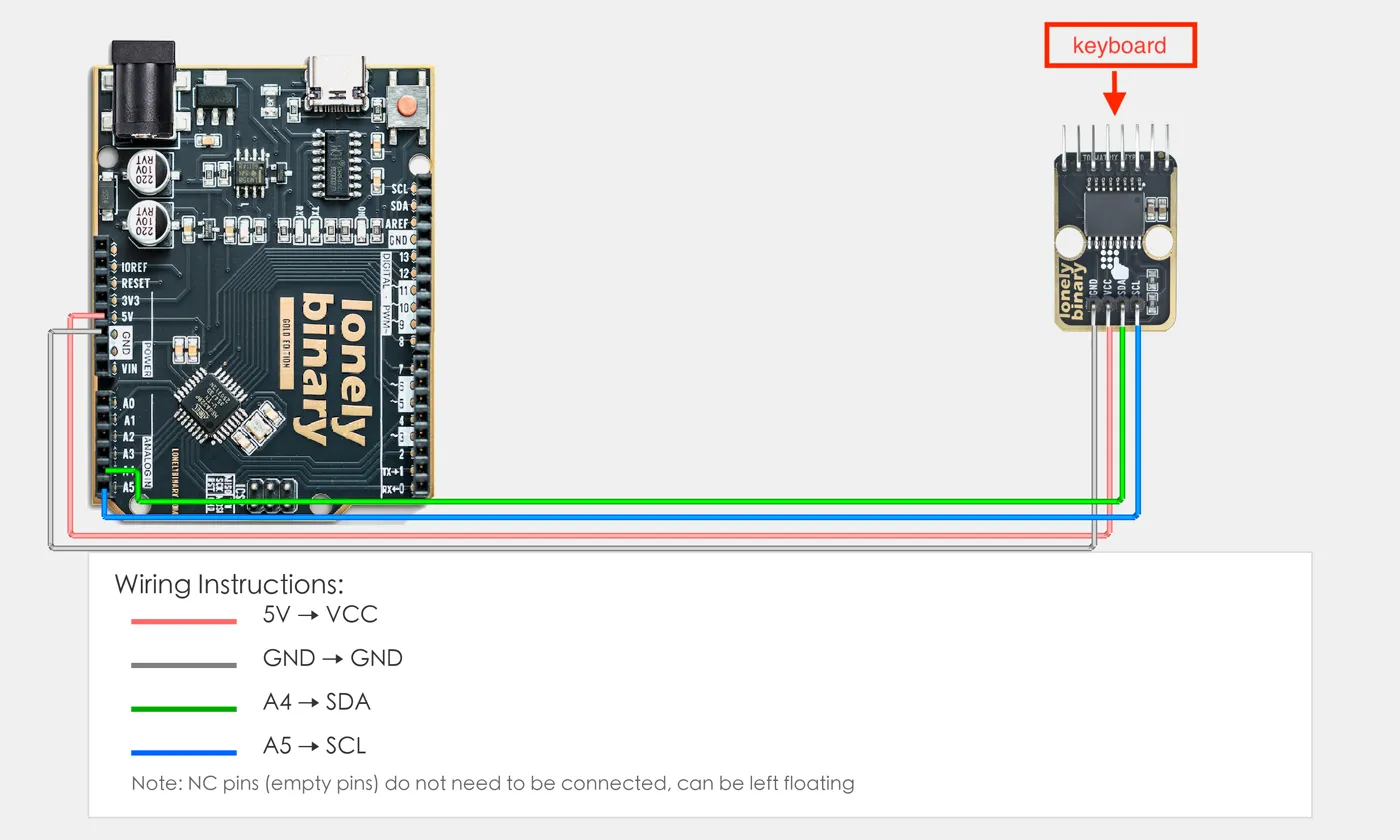
Four wires from the adapter to an Uno or an ESP32, one library from the Library Manager, and a sketch that prints each key once as it goes down. Feed the adapter from the board's own logic voltage, not from 5 V.
Install the library
In the Arduino IDE, open Sketch → Include Library → Manage Libraries, search for I2CKeyPad and install the one by Rob Tillaart. It needs nothing else.
Four wires
| Adapter | Arduino Uno | ESP32 | ESP32-S3 |
|---|---|---|---|
| GND | GND | GND | GND |
| VCC | 5V | 3V3 | 3V3 |
| SDA | A4 | GPIO 21 | GPIO 8 |
| SCL | A5 | GPIO 22 | GPIO 9 |
The ESP32 pins are the Arduino core's defaults. VCC is the one to get right: the adapter's pull-ups go to it, so it decides what voltage SDA and SCL sit at.
Run it
Upload the sketch below, open the serial monitor at 115200 and press a few keys. Each one prints once. Holding a key prints nothing more; releasing it and pressing again prints it again.
The loop asks for the key every 20 ms and prints only when the answer changes.
That one line — if (c != last) — is what stops a held key printing fifty
times a second, and it is also why the N between presses and the brief F of a
fast typist never appear.
The code
Prints each key once, as it goes down. It checks the adapter answers before anything else, and reads every 20 ms — fast enough for any typist, slow enough to hide contact bounce. Uncomment the map for the keypad in your hand.
// The first keypress: print every key once, as it goes down.
//
// Wiring, adapter to board:
//   Adapter GND -> board GND
//   Adapter VCC -> board 5V on an Uno, 3V3 on an ESP32 or ESP32-S3
//   Adapter SDA -> Uno A4, ESP32 GPIO 21, ESP32-S3 GPIO 8
//   Adapter SCL -> Uno A5, ESP32 GPIO 22, ESP32-S3 GPIO 9
//
// Arduino IDE: install "I2CKeyPad" by Rob Tillaart from the Library
// Manager. Any of the three boards, no special Tools settings.
// Serial Monitor at 115200.

#include <Wire.h>
#include "I2CKeyPad.h"

const uint8_t KEYPAD_ADDRESS = 0x20;   // as shipped

// 16 keys, then N (no key) and F (fail). Pick the one for your keypad.
char keymap[19] = "DCBA#9630852*741NF";      // soft keypad: 5-pack, TinkerBlock
// char keymap[19] = "D#0*C987B654A321NF";   // heavy-duty keypad: 2-pack

I2CKeyPad keyPad(KEYPAD_ADDRESS);
char last = 'N';

void setup() {
  Serial.begin(115200);
  delay(500);
  Wire.begin();
  Wire.setClock(100000);   // the PCF8574 is rated for 100 kHz
  if (!keyPad.begin()) {
    Serial.println("No keypad at 0x20 - check GND, VCC, SDA and SCL.");
    while (true) delay(1000);
  }
  keyPad.loadKeyMap(keymap);
  Serial.println("Ready. Press a key.");
}

void loop() {
  char c = keyPad.getChar();
  if (c != last) {                       // only when something changed
    if (c != 'N' && c != 'F') Serial.println(c);
    last = c;
  }
  delay(20);
}
If it prints “No keypad at 0x20”, nothing answered at that address: check the four wires, then run the bus scan in the last article. If keys print but the wrong ones, it is the keymap, not the wiring.
When it does not work
Nothing answered. Check that GND and VCC are really connected, that SDA and SCL are not swapped, and that they go to your board's I²C pins — A4 and A5 on an Uno, not the digital pins. If an address pad on the back has been bridged, the adapter is at a different address; scan the bus.
The other keypad's map is loaded. Swap which keymap line is commented out. If neither is right — a keypad from elsewhere, or a socket fitted upside down — run the keymap finder.
Set the monitor to 115200 baud, the speed in Serial.begin(). On an ESP32-S3 with two USB sockets, make sure the monitor is open on the port the sketch was uploaded through.
No — that is the unsafe choice. The adapter's pull-ups tie SDA and SCL to its VCC, so from 5 V both lines sit at 5 V against pins rated for 3.3 V. The chip runs on anything from 2.5 V, so 3V3 is correct.
The same four wires and the same loop, with a code, a lockout and a pin that opens.
A PIN code lock →Edit this page — content/books/matrix-keypad/first-keypress.mdx
Questions about this product
See what other owners have asked, and read their solutions.
This page covers several products. Choose yours to see the right discussions.
Discuss this article
Ask about this page. The answer stays here, on the page it belongs to, for whoever hits the same wall next.