The six pins
Six pins, and every one gets a wire. Three are analog: X and Y from the stick, and BTNS, which carries all six buttons. KEY is the click under the stick, a digital pin. 3V3 and GND are the supply, with GND on the square pad at the right-hand end.
Eight inputs on six pins
The board carries a thumb stick and six buttons, and the stick counts three times: it tilts along two axes and clicks when pushed straight down. That is eight inputs, and the header has six pins, two of them the supply. The trick is BTNS, which puts all six buttons on one analog pin.
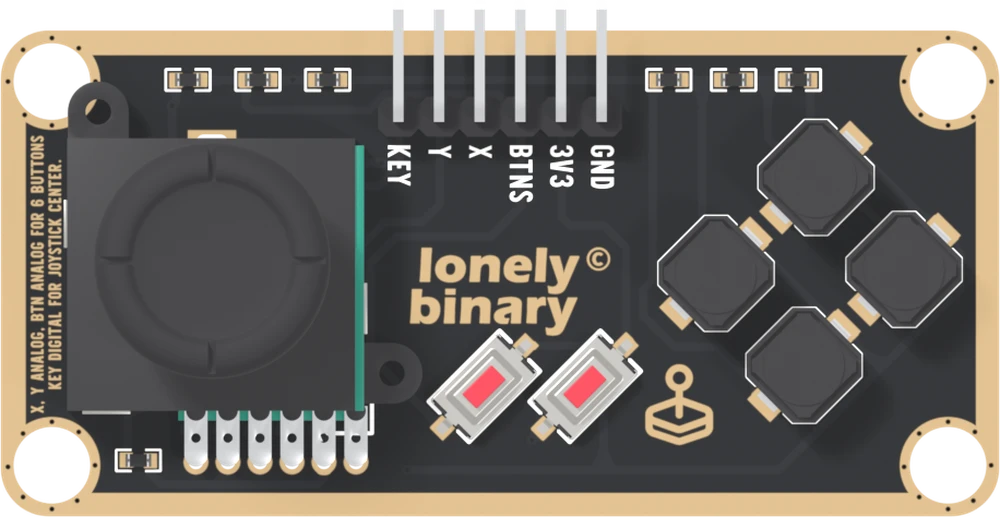
The six names
KEY is the switch under the stick. It reads LOW at rest and HIGH while the stick is pushed down, because a 10 kΩ resistor on the board pulls it down. A digital pin reads it.
Y and X are the stick's two axes. Each is the wiper of a potentiometer whose track runs from 3V3 to GND, so each is a voltage that rests near the middle and follows the tilt. Each needs an analog pin.
BTNS is the six buttons. Each one, pressed, lifts BTNS to its own share of 3V3, and nothing pressed leaves it at 0 V. It needs an analog pin too.
3V3 is the supply, printed that way on purpose. This book wires it to 3V3 on every board, the Arduino Uno included, and the first read says what that does to an Uno's numbers.
GND is on the square pad, at the right-hand end. It is the one mark that tells six identical holes apart, so count from it.
The left edge of the board says the same thing in small print, turned on its side: X and Y are analog, BTN is analog for six buttons, and KEY is digital for the stick's centre.
The back of the board
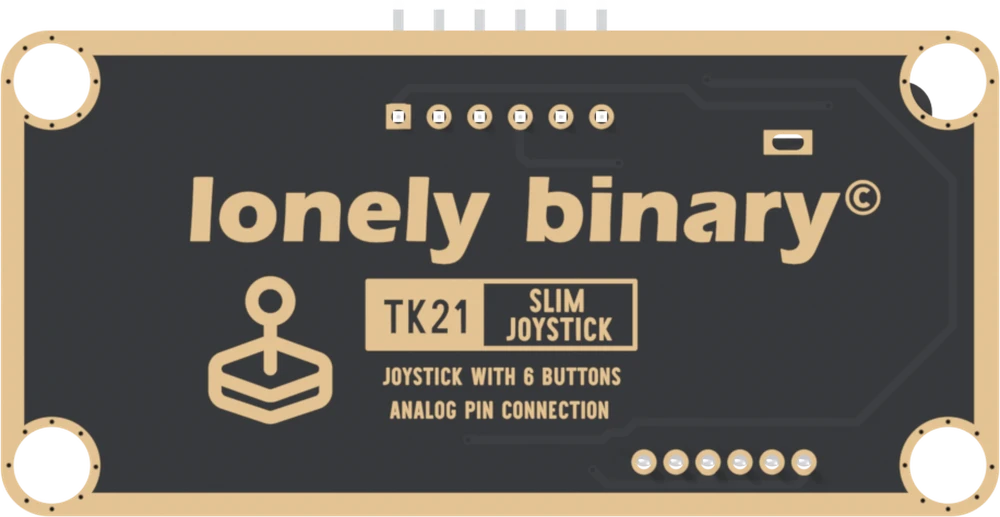
Turned over, the order reverses. The square pad is on the left, and it is still GND. The back prints TK21, the number on the box, and no pin names at all.
When it does not work
Hold the board parts up with the header along the top edge and its pins pointing away from you. Read KEY, Y, X, BTNS, 3V3, GND from left to right. GND is the right-hand end, and it is the square pad, which you can still see when the printed names are hidden.
No. There is no NC pin on this board. If you never use the buttons you can leave BTNS off, and if you never click the stick you can leave KEY off, but the handbook's sketches read all six.
Turned over, the back prints TK21 SLIM JOYSTICK and six plain pads. The square one is now on the left, and it is still GND. Count from it: GND, 3V3, BTNS, X, Y, KEY.
No. BTNS is a voltage that changes by button: all of 3V3 for one, a half, a third and less for the others. A digital pin sees only HIGH or LOW, so at best it would find one or two of the six. It needs an analog input.
The stick, the red pair, the diamond, and the long board they sit on.
What is where →Edit this page — content/books/slim-joystick/the-six-pins.mdx
Questions about this product
See what other owners have asked, and read their solutions.
Slim Joystick
Loading discussions…
Discuss this article
Ask about this page. The answer stays here, on the page it belongs to, for whoever hits the same wall next.