What is on it
Four parts and a header. A black 5 mm Everlight PT334-6B phototransistor stands up off the board and looks straight up. A 10 kΩ from SIGNAL to GND turns its current into the reading. A red LED and its 1 kΩ, also on SIGNAL, light only in strong infrared. There is no chip, no filter and no decoder.
Four parts
Pick each part. Sensor is the black dome: an Everlight PT334-6B, a phototransistor in a 5 mm package, standing straight up. Its two legs go into the board 2.54 mm apart: the collector to VCC and the emitter to SIGNAL.
10 kΩ is R7, the load. Every microamp the sensor lets through flows down it to GND, and the voltage across it is SIGNAL: 0.1 mA makes 1 V. It is the scale of the whole reading, not a pull-down in the sense a button uses one.
LED is a red LED and its 1 kΩ, R8, also from SIGNAL to GND. Set Infrared to Some and it stays dark; set it to Strong and it lights. It runs on the sensor's own current, so it lights only when SIGNAL passes about 2 V, and while lit it takes part of that current. That changes the top of the reading, which is the LED bends the curve.
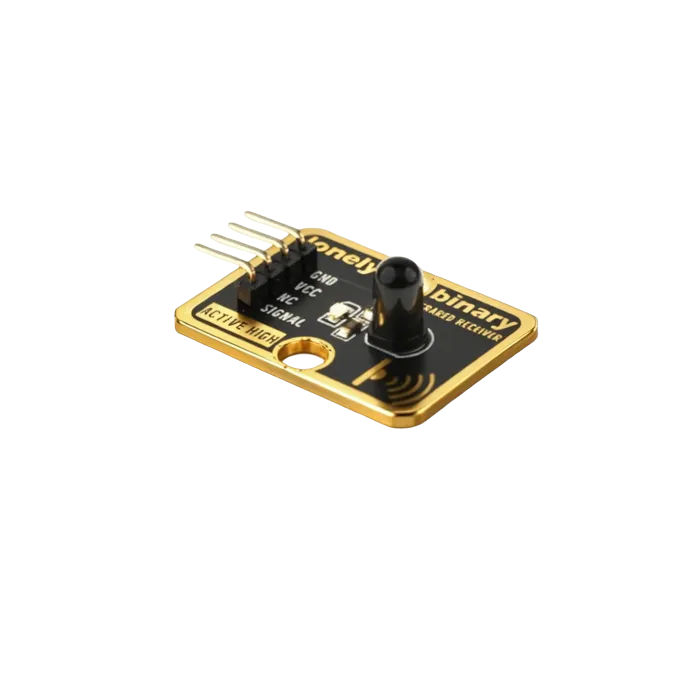
A phototransistor, not a photodiode
The page this book replaces called the part a photodiode. It is a phototransistor, and the difference is size. A photodiode turns light into a tiny current; a phototransistor is a transistor whose base is lit, and it multiplies that current many times over. So a bare 10 kΩ is enough to turn it into volts, with no amplifier on the board.
What is not on it
No chip, no filter, no decoder, no capacitor. Nothing on the board decides what counts as a signal: SIGNAL is the light, turned into a voltage, and your sketch does the rest. That is what lets it see a steady beam, and why it also sees the sun.
When it does not work
Probably not. The LED is fed by the sensor's own current and only lights once SIGNAL passes about 2 V, which takes strong infrared: a lit TK63 held close to the dome, or a filament bulb nearby. In an ordinary room it stays dark while the reading still moves.
It is shaped like one, but it is a phototransistor: it receives light rather than giving it off. Its black plastic stops visible light and lets infrared through, which is why it looks opaque.
Straight up, away from the board. For a beam, stand the TK63 and TK64 so their domes face each other; for a reflection, lay them side by side, both looking up at the thing to detect.
Better not. The maker's datasheet asks for any bend at least 3 mm from the plastic and made before soldering; on a finished board a bend strains the joints and can crack the package. Turn the whole block instead: its LEGO holes let it stand on edge.
How a current through 10 kΩ becomes the number you read.
Light becomes a voltage →Edit this page — content/books/ir-photodiode/what-is-on-it.mdx
Questions about this product
See what other owners have asked, and read their solutions.
Infrared Receiver
Loading discussions…
Discuss this article
Ask about this page. The answer stays here, on the page it belongs to, for whoever hits the same wall next.