Specifications
| Type | Single-wire temperature and humidity sensor on a breakout board |
|---|---|
| DHT22 · TK39 | -40 to 80 °C at ±0.5 °C, 0–100 % RH at ±2 %, tenths of a degree and tenths of a per cent, one reading every 2 s |
| DHT11 · TK38 | 0 to 50 °C at ±2 °C, 20–80 % RH at ±5 %, whole degrees and whole per cent, one reading every 1 s |
| Wires to your board | 3 — GND, VCC, and the 1 signal wire DATA. The fourth pin, NC, is connected to nothing |
| Protocol | Single-wire, Aosong's own. No addresses, so it is neither I2C nor Dallas 1-Wire, and every sensor needs a pin of its own |
| Supply voltage | 3.3 V or 5 V — the DHT11 takes 3–5.5 V, the DHT22 takes 3.3–6 V. Whatever you feed VCC is what the data line idles at |
| Pull-up resistor | 10 kΩ from VCC to DATA, already fitted on both boards |
| Boards | TK38 22.4 × 33.9 mm, TK39 22.4 × 42.9 mm, both with a 2.54 mm 4-pin header and two mounting cut-outs |
| Current | 1 to 2.5 mA while measuring, under 200 µA between readings |
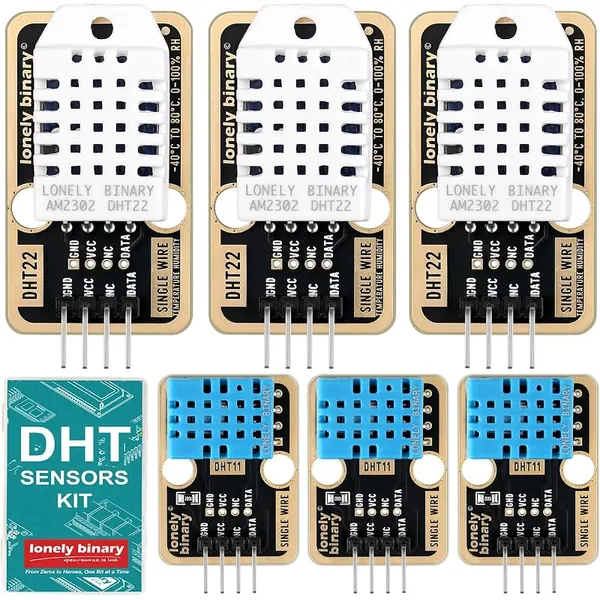
| In the box | The DHT sensor kit holds 6 boards — 3 × DHT22 on the TK39 and 3 × DHT11 on the TK38 — plus a storage case. The TK38 and TK39 also ship singly and in the TinkerBlock kits |
What it does
Two numbers — temperature and relative humidity — down one ordinary digital pin. Behind the plastic grille are a capacitive humidity element, a temperature element and a small microcontroller that reads both and applies its own factory calibration before sending anything, so there is no resistor to choose, no reference voltage to supply and nothing to calibrate.
It is not I²C and it is not Dallas 1-Wire, despite the single wire. There is no address in the protocol at all, so an I²C scan will never find one, and each sensor needs a data pin of its own.
The two boards
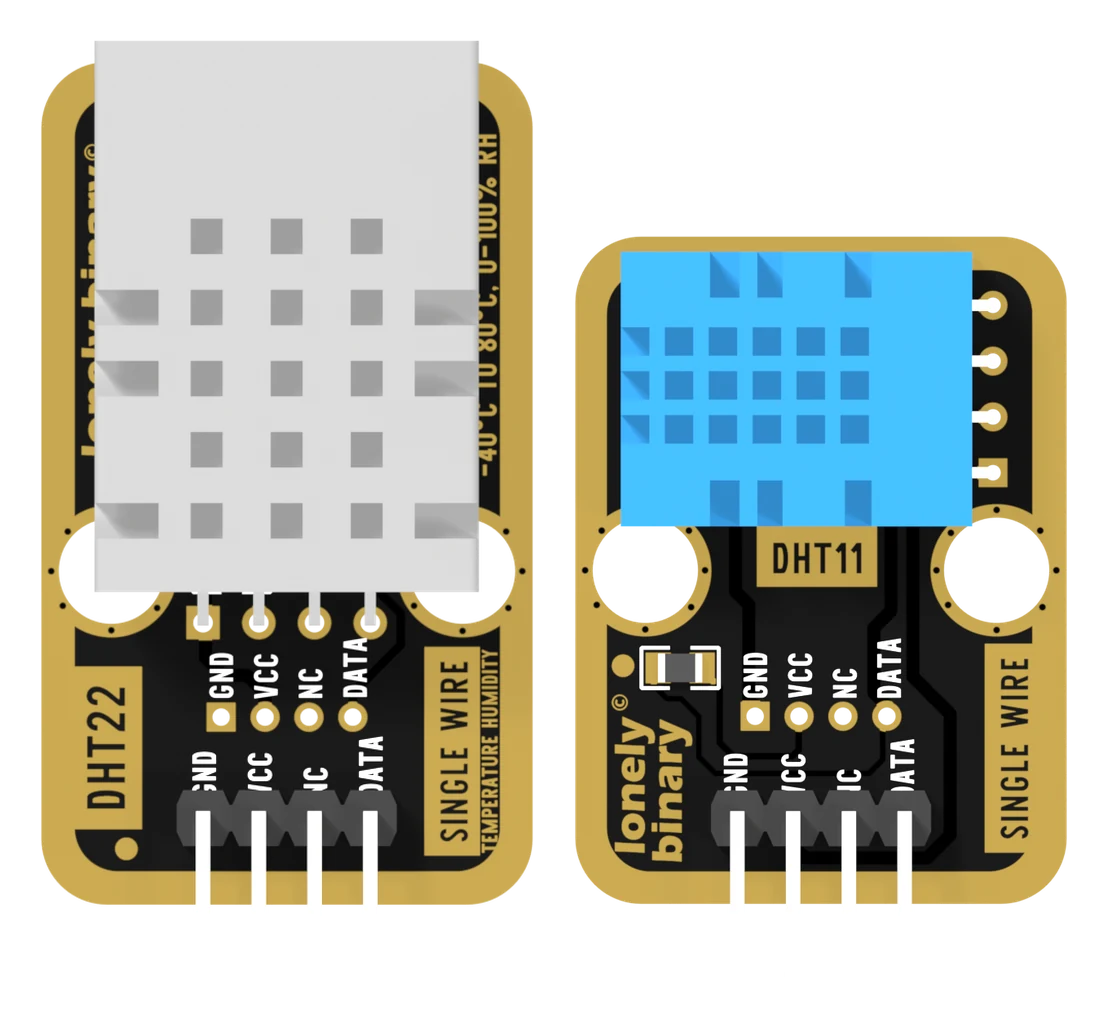
Three of each in the kit, and they are the same PCB with a different sensor on top: the same three nets, the same four pads, the same 10 kΩ pull-up already fitted.
Which one
| DHT11 · TK38 | DHT22 · TK39 | |
|---|---|---|
| Temperature | 0 to 50 °C, ±2 °C | −40 to 80 °C, ±0.5 °C |
| Humidity | 20–80 % RH, ±5 % | 0–100 % RH, ±2 % |
| Steps | 1 °C, 1 % | 0.1 °C, 0.1 % |
| A reading every | 1 s | 2 s |
| Supply | 3–5.5 V | 3.3–6 V |
| Use it for | learning, a display you glance at | logging, outdoors, anything that switches |
The range is the hard limit: below 0 °C the DHT11 is outside its specification and does not warn you about it, so an outdoor logger built on one goes blind on the coldest night of the year. The accuracy is the soft one, and it matters exactly when something downstream acts on the number.
Wiring, in four lines
- GND to the board's GND. It is pin 1, on the square pad.
- VCC to 5V on an Uno, 3V3 on an ESP32, ESP32-S3 or Pico.
- NC to nothing. It is connected to nothing on the board either.
- DATA to any free digital pin — D2 on an Uno, GPIO 18 on an ESP32.
VCC is the one that is not free choice. The board's 10 kΩ pull-up ties DATA to it, so from 5 V beside a 3.3 V processor the data line idles 1.7 V over the pin's rating.
Example
Install DHT sensor library by Adafruit from the Library Manager, and accept Adafruit Unified Sensor when it offers it.
#include <DHT.h>

#define DHT_PIN  2      // Uno D2.  ESP32: 18.  ESP32-S3: 4.
#define DHT_TYPE DHT22  // DHT22 for the white cage, DHT11 for the blue one.

DHT dht(DHT_PIN, DHT_TYPE);

void setup() {
  Serial.begin(115200);
  dht.begin();
}

void loop() {
  // Two calls, one exchange: the library caches for two seconds, so the
  // second reads the bytes the first fetched.
  float humidity = dht.readHumidity();
  float celsius  = dht.readTemperature();

  // A failed read returns nan rather than throwing, and one failure in a
  // hundred is normal for this protocol. Checking is not optional.
  if (isnan(humidity) || isnan(celsius)) {
    Serial.println("read failed");
  } else {
    Serial.print(celsius);  Serial.print(" C  ");
    Serial.print(humidity); Serial.println(" %");
  }

  delay(2000);   // the floor is 2 s, for both sensors, in this library
}import dht, machine, time
# dht.DHT11 for the blue cage. The class is the only thing that changes.
sensor = dht.DHT22(machine.Pin(4))
while True:
try:
sensor.measure()
print(sensor.temperature(), sensor.humidity())
except OSError:
# measure() raises rather than returning nan. Same failure, different
# shape: nothing answered, or the checksum did not match.
print("read failed")
time.sleep(2)Where to start
The handbook below is twelve short articles with a working figure in each. If you only read one, read forty bits and a checksum — it is why declaring the wrong sensor prints a confident wrong number instead of an error. If you want a reading now, the first reading is the whole build, and DHT11 or DHT22 decides which of the six boards to reach for.
Wiring diagram
Full board reference: ESP32-S3 pinout.
When it doesn’t work
- Every reading comes back as nan.
- Nothing answered on the wire — that is the only error this protocol can produce. Check GND, then that VCC is on a powered rail, then that DATA is on the pin your sketch names, counting from the square pad: GND, VCC, NC, DATA. Then check the sensor type in the sketch: a DHT11 declared as a DHT22 gets a start pulse eighteen times too short and usually never wakes.
- It prints numbers, but silly ones — 2 % and 0 °C, or a humidity in the hundreds.
- The wiring is right and the type is wrong. Both sensors send forty bits with a valid checksum; a DHT22 packs tenths into two bytes and a DHT11 puts whole units in one, so decoding either as the other succeeds and produces nonsense. Blue cage is DHT11, white cage is DHT22, and the back of the board says which.
- The reading never changes.
- You are reading faster than two seconds. Adafruit's library caches for 2000 ms — for the DHT11 as well, whose own datasheet allows one second — and inside that window it returns the previous value without touching the wire. Put the read on a millis() timer.
- Can I power it from 5 V next to an ESP32?
- No. The board's 10 kΩ pull-up ties DATA to VCC, so from 5 V the data line idles at 5 V against a pin rated for 3.3 V. It will appear to work, which is the problem — the damage is cumulative. Feed it 3V3; both sensors are specified there.
- It reads two or three degrees higher than my thermometer.
- Self-heating. The sensor is measuring the board it is plugged into, not the room. Move it off the breadboard on three long jumper wires, away from the regulator and the USB socket, and give it a few minutes. The humidity improves with it: a sensor that reads warm also reads dry.
- Can I put two sensors on one pin?
- No. There is no address anywhere in the protocol, so both would answer at once and neither reading would survive. Sensors share power and ground and need a data pin each — six sensors is six pins.
- Is the DHT22 the same as the AM2302?
- The same sensing part, and the cage on these boards is printed AM2302 DHT22. The name AM2302 usually refers to Aosong's version with a cable and the pull-up already attached; the bare four-pin part is normally sold as DHT22. Either way the library type is DHT22.